You have already created a Facebook Group for your chosen niche.
You already have an active Affiliate Account in our online shop.
You have already posted at least 20 different campaigns on your Facebook Fan Page and Facebook Group. A campaign (or offer) is a post that include valuable information for your customers, and your affiliate link for them to click when they want to learn more about your campaign. A campaign is not effective if it does not compel your prospect to click your affiliate link. Therefore you should take your campaigns very seriously, because your income in this business starts to get more real from this. An effective campaign should have the following qualities:
It should show a clear picture or a video
It should show how you are proposing to solve your customer’s problems
It should show that your customers will definitely get value if they just click your affiliate link
It should show a “call to action” to click your affiliate link
The Steps
1. Join many Facebook Groups that are related to your target niche.
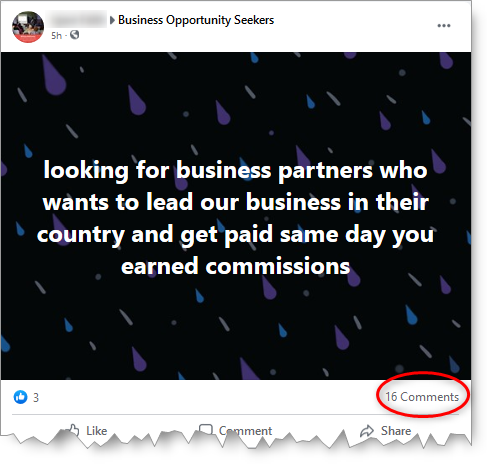
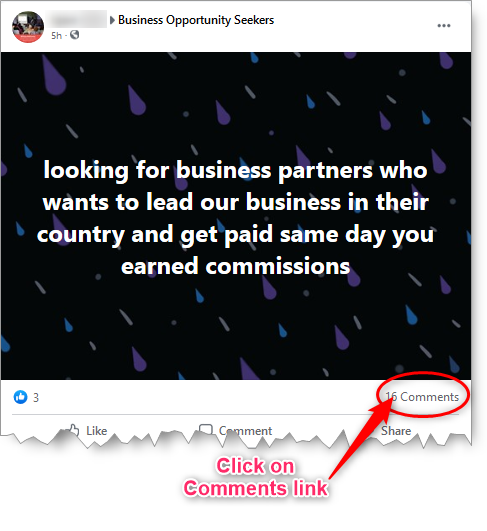
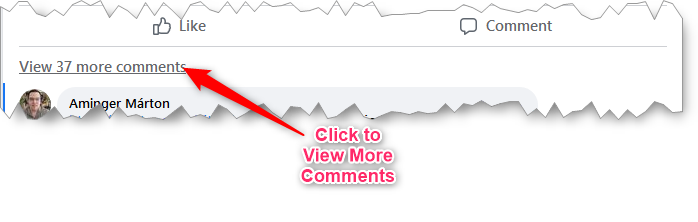
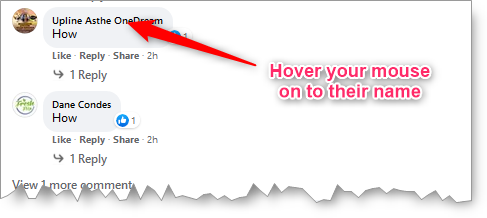
2. Once joined, you look for posts within that has people responding to the post. Please note that this post is not necessarily you have created yourself; it could be someone else’s post.
For example:
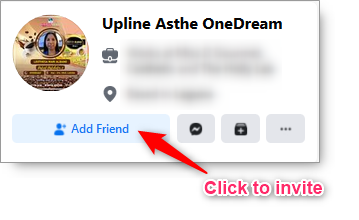
3. “Add Friend” each responding people who are legitimately interested. Do not add those who are just responding to promote their own business as they will most likely spam you with their own campaigns.
Here’s how to do it:
Look for those who were asking for more information, so you can invite them to be your friends.
Usually, they comment “How” or “More Info”.
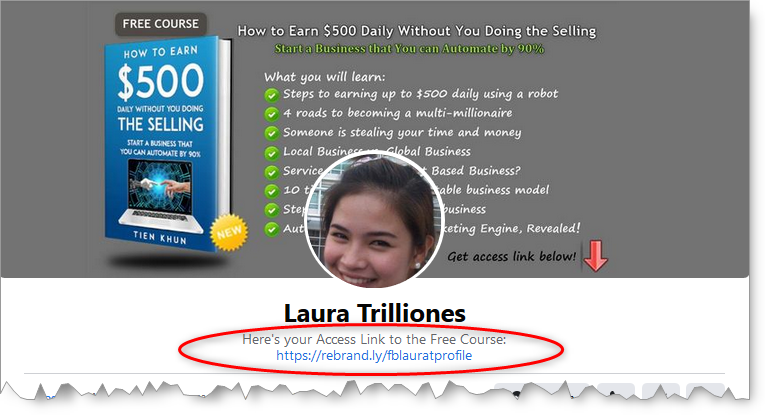
Please bear in mind that these people you have invited to be friends with in Facebook would most likely check out your own Facebook Profile first before deciding. So it is therefore a good idea that you have your Profile Page already inviting them to your affiliate link.
For example, here’s the Profile Page of one of our co-members showing an opportunity for the viewer to get a free course by clicking her affiliate link:
4. Once you have enough new Facebook Friends after doing many times as above, you then go to your Facebook Fan Page to invite them to like your page.
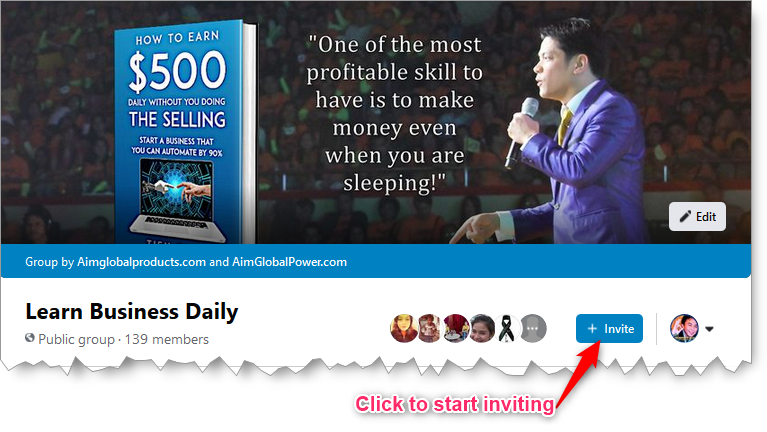
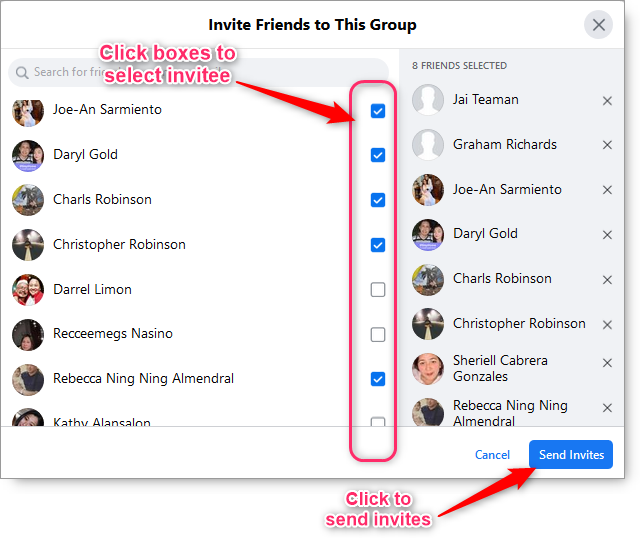
5. You also invite them to your Facebook Group.
For example, I have just started a Facebook Group targeting the wealth niche. All I have to do is invite my new friends to join it.
Expectations
If you continue to do this strategy everyday, then you can expect the following scenario’s.
If you are able to make, say 15 people everyday, to successfully join your Facebook Group, then you can expect to have collected 5,475 targeted potential customers in a year per Facebook Group that you have created.
Provided that you have been posting at least 20 effective campaigns in your Facebook Group or Facebook Page. You would most likely get people clicking your affiliate links, and they will most likely share your posts/campaigns to their own friends as well.
For those who will click your Affiliate Links, they will most likely get drawn to buy your offer because when they opt-in our Mailing List, AIME system will automatically send them emails to educate and follow-up them regularly about your offers.
You should by now realize that the more people you get invited to Facebook Group or Facebook Fan Page, the more people will get to click your Affiliate Links. The more clicks to your Affiliate Links would mean more chance to have them opted-in our Mailing List so our AIME System can eventually push them to buying your offers. Basically, if you want more sales to get more income, you need to collect more and more targeted customers each day.
I hope you have learned a lot from this tutorial, and that those learning will help you generate more income in our AIM Global Business.
Not yet really good with Direct Selling and doing live presentations? No problem, you can choose to do Affiliate Marketing first so you can start earning as early as today!
Affiliate Marketing is AIM Tycoons 2nd of the 7th way to earn in AIM Global.
With Affiliate Marketing via AimGlobalProducts.com Affiliate Program (AGPAP) you can:
Earn 15% commission from Product sales that resulted from your referrals
Earn 3.85% commission from Global Package sales that resulted from your referrals
Acquire global downlines from recruits that resulted from your referrals
But before you continue reading, Change to another currency? * Base currency is ₱, using today’s rate.
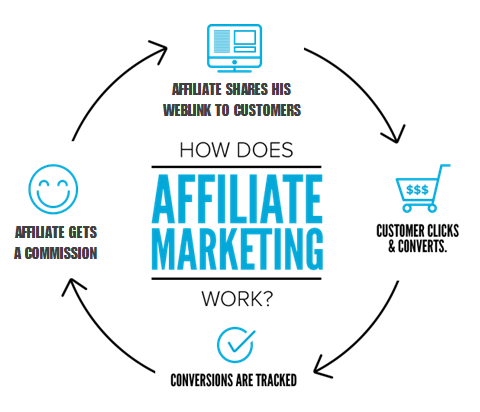
How Does Affiliate Marketing Work?
Affiliate Marketing is a business model in which you can earn money (or more) by referring people to an online shop or website that pay you sales commissions through the use of an Affiliate Program.
source: projectlifemastery.com
What is AGPAP?
As an AIM Global Distributor under AIM Tycoons group, you are able to register an Affiliate account for AimGlobalProducts.com Affiliate Program (AGPAP). In your Affiliate account, AGPAP will allow you to create Affiliate Links that will forward your prospects to AimGlobalProducts.com website where they can make purchases of products or global packages. For each successful sales from your referrals; AGPAP will pay you applicable 3.85% or 15% commission. Also, you will be endorsed as the Upline if the customer eventually decides to become an AIM Global Distributor too. As you can see, you can grow the number of your downlines quite conveniently and in a worldwide manner!
Please note that AGPAP is an exclusive property of AIM Tycoons founders.
What is an Affiliate Link?
An Affiliate Link is essentially a web address (pointing to a sales page within AimGlobalProducts.com) that you want people to visit, and because your Affiliate Link includes your unique Affiliate ID, which identifies you as the referrer, AGPAP can associate you to the resulting sales so you can earn due commissions and downlines, if applicable.
AGPAP is a Part of AIME!
AGPAP is just one of the many parts of Automatic Income and Marketing Engine (AIME) developed and owned by leaders of AIM Tycoons group. Thus AIME is free for AIM Tycoons group members and has the following components:
AGPAP – to allow you to earn money by referring people using Affiliate Links
Global Eshop – a responsive global online store which can: automatically show prices into your prospects local currency; process orders; and accept payments
Autoresponder – which captures your prospect’s email address in order to automatically send follow-up messages to them which will educate them more about our products, and urge them to make their purchases quickly
Landing Pages – to compliment the follow-up messages with online presentations complete with “call to action” buttons or links
Chat Bot – to instantly chat with your prospects “live” with the intention of guiding them to make their first purchase or become a Distributor too
AGPAP Sample Earnings
Here’s just a sample of what you can earn with AGPAP:
Item Name
Your Commission
Global Mega Package
$8.50 per unit
Complete
$3.20 per box
C24/7
$3.37 per box
Restorlyf
$4.34 per box
Perfect White
$4.85 per box
** For conciseness other products are not shown
AGPAP is Exclusive Only to AIM Tycoons Group and Affiliates!
AGPAP is only provided exclusively for free to AIM Tycoons group members and Affiliates. AGPAP is not applicable to other AIM Global independent group of Distributors because the Product Points conflict between crosslines. If an Affiliate decides to become an AIM Global Distributor but joins other group than AIM Tycoons, his affiliate account will be terminated including all affiliate commissions.
Why Choose Affiliate Marketing with AGPAP?
Free Affiliate Marketing training for you and your downlines!
You can start as early as today to make money
You can earn as much as $544.19 daily using a free program and start with $0.00 investment!
You don’t need experience or advanced computer skills to start earning
You don’t need to create or have your own product to sell, therefore you don’t need a warehouse or build your product stocks.
You can work at home, at your own leisure.
You don’t need to do the selling since AIME does the selling for you
You don’t need to worry about delivering products since AIME will do it for you
You don’t have to worry about customer follow-ups and support since AIME will do it for you
You can grow your downlines at a global scale more quickly
You will not be limited to do AIM Global only within your country
The cookie life of your Affiliate Links are as long as 180 days!
Strategies for Affiliate Marketing
Here some of the strategies you can implement for Affiliate Marketing:
1. Facebook Marketing Strategy
In this strategy you start by showing your Affiliate Links in your Facebook Profile, for example in your cover photo and descriptions. You will also be creating Facebook Fan Pages for each of your target niches. For example you will have separate Facebook Fan Pages for Health, Wealth and Beauty. In your Facebook Fan Pages you will create at least 20 posts having valuable information for your specific target niche. In these posts you will include your Affiliate Links strategically pointing to relevant pages in AimGlobalProducts.com website. After completing your first 20 posts, it is the only time you will invite people to your Facebook Fan Pages. This is to ensure that the first time visitors to your page will have a good impression about your Facebook Fan Page and would willingly decide to “like” and “follow” your Facebook Fan Page. Since your 20 posts are already of good value for them, it is very likely that they will share your Facebook Fan Page to their friends, making you gain more followers in the process. After creating your Facebook Fan Pages, you will then create Facebook General Group for each and applying the same strategy as with posting 20 relevant posts with your Affiliate Links and inviting people to join your groups, right after.
Your performance goal in this strategy is to regularly post at least 1 new content daily and invite at least 15 new friends daily to your groups or pages.
2. Hand-out Strategy
In this strategy you will be creating prints as hand-outs, such as: flyers and business cards that gives-out valuable information or offer free gifts. Also on these hand-outs, included in the print are your shortened Affiliate Links.
3. Poster Ad Strategy
In this strategy you will be creating posters that gives-out valuable information or offer free gifts and included in the print are your shortened Affiliate Links. You will then post your posters on physical locations where there are many people.
How to Get Started with AGPAP?
Here are the steps to join and implement this free program:
Click the “GET FREE TRAINING” button below
Check your email inbox, click the verification link sent
Create an Affiliate Account
Share your affiliate links to your social media accounts
Your revenue in Affiliate Marketing greatly depends on the number of people clicking your Affiliate Links. When they click, it means that they are closer to being sold to your offer.
But most people don’t click because of many reasons. Read on…
Why people will NOT click your Affiliate Links?
Here are my top 4 reasons why people will not click your Affiliate Links:
1. You failed to get their ATTENTION
How can people click your Affiliate Links when they have not even noticed your campaigns? Your campaigns usually fail to get attention because you either did not include an eye catching image or a video. Also, according to a study, videos are far better than images when it comes to getting peoples attention. So make sure your campaigns always include an image or a video, and make sure that they are “eye catching” ones and not the crappy ones that look unprofessional. When posting your campaigns on Facebook and you have no video to include, make sure that your campaign would at least show a featured image. You do this by first debugging your affiliate links. And if you need videos, there’s a way to download from Youtube or download from Facebook.
2. You failed to give them a strong REASON to click
Okay let’s just say they noticed your campaign because it has an eye catching image or a video, but why would they want to find out more and click your link? What’s in it for them? That’s why in your campaigns you should always include compelling headlines and texts that will get them interested. For example, compare between: (A) “Earn Lots of Money! Join Us!” and (B) “Earn up to $704 Daily Worldwide! Get Your FREE Training TODAY!”. Which one do you think will get more clicks? It’s (B) because it’s more specific with the earning and “free training” sounds that they will get something out of it, like the learning without paying anything. So of course they will get interested and will click (B).
3. You failed to get their TRUST
You got their attention and your offer sounds interesting to them, but they don’t trust you. For that reason, they will not click. This usually happens if they have known you as an “opportunity junkie” –meaning you are not there for them but you are just there to make your own money. They can tell because all your campaigns are spammy, too commercial, and are from too many different companies or different opportunities, and you come as a seller and not a helper for their problems. So don’t be an “opportunity junkie” selling many unrelated opportunities in a very spammy , boring and unprofessional way. Know that people will often buy not because of the product or opportunity, they buy because they trust who is selling.
4. You FORGOT to include your Affiliate Link
You got them looking at your offer, they are very interested and they trust you with all their heart, but you forgot to include your Affiliate Link. Of course no click will happen! So don’t forget to always include your Affiliate Link.
How to Effectively Post Your Affiliate Links
Now that you know why people will not click your links, you can now create campaigns more effectively.
Here are my top 5 recommendations…
1. Create Many Campaigns
Ideally you would have Affiliate Links created for every recommended pages and products within AimGlobalProducts.com. There are already 4 done-for-you Affiliate Links available from your Tracking Page, and they are already a good start for you.
2. Include Ad Texts and Image (or Video)
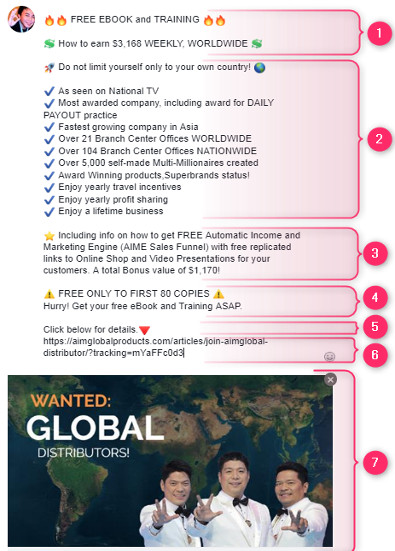
An Affiliate Link alone will not bring you people clicking it. Your Affiliate Link should be accompanied with good “attention grabbing, and sale converting” ad texts and image or video. The essential contents are as follows:
Essential Contents for Effective Sales Conversion
Attention-grabber Headlines – choose headlines that will get people’s interest. Usually it answer’s the question, “What’s in it for them?” It should be specific to their needs.
Offer of Benefits – here you can detail the benefits of your offer.
Extra Benefits on Offer – in this part you will detail the extra benefits if they will choose you over other competitors.
Scarcity Statement – is among the most important content in your campaign. In here you want them to feel that they will lose a great opportunity if they don’t take your offer immediately.
Call to Action – in here you are literally telling them what to do.
Your Affiliate Link – is the link that you want them to click, because through it you will earn commissions.
Eye-catching Featured Image or Video – without a featured image or video, your post will surely not grab a good deal of attention. Do not make it look too commercialized because people tend to ignore Commercial Ads online quite often. You’d also want this to be clickable with your Affiliate Link.
3. Not Really Good with Writing Ad Texts? Copy Ours!
No problem! You can just go to our Facebook Fan Page where you can see live campaigns. In there you can just copy, replace the link with your own Affiliate Link and paste to your own campaigns. So don’t forget to give our Facebook Fan Page a “like” and “follow” so you can get informed of new campaigns that you can also copy. Some live samples are shown in the next lesson.
4. Always Use Facebook Debugger!
When posting on Facebook, you should always debug your Affiliate Links before posting it so it will show a featured image. With featured image, your post will attract attention much better than without.
5. Shorten your Affiliate Links and Track Clicks
As you would discover it is also important to shorten and track clicks on your links. Read on..
How many clicks are needed to get a sale?
Not all people that clicked your Affiliate Link will make a purchase instantly. Do you? Of course not.
According to an accepted norm, people need to see the same ads (campaigns) at least 7 times before they respond. That’s why our Affiliate Program is equipped with capture pages to get people sign-up to our Mailing List. Through the Mailing List they can be sent automatic follow-up messages so they can see at least 7 times your offers for them.
Although it is the case, generally you don’t get 100% sales conversion as it also depend on many other factors. It depends on the current needs or wants of the people, the type of industry of the offers, the effectiveness of the marketing strategy, and all other market related considerations.
For our Affiliate Program, maybe we can assume a 1% sales conversion –meaning out of 100 unique clicks you may have 1 sale. But then again, this is just a pessimistic assumption. So maybe realistically it could be as high as 20% or more, again depending on many factors as mentioned. On that note, what do you do then? Know that Affiliate Marketing is a “number’s game” –you have to pursue strongly in getting as many unique clicks, assume a 1% sales conversion in the beginning and expect that a sale may come every 100 unique clicks. At the same time, you need to track clicks on your links and compare them to your sales. Read on…
How to track clicks?
As you have learned above, you need to know how many clicks your Affiliate Links are getting and compare them to the sales you are converting. Because through the comparison you will be able to expect results more realistically and you can fine-tune your next campaigns to be more effective by knowing what campaigns work and what don’t. As you would understand, the better your campaigns improve, the better your sales improve too.
WARNING!
Do not infringe copyrights as you will surely get into trouble. You should only download videos that are safe to use. These safe videos are those either (1) you created your self, (2) you bought the rights to use, (3) listed in the public domain, or (4) you have permission to use.
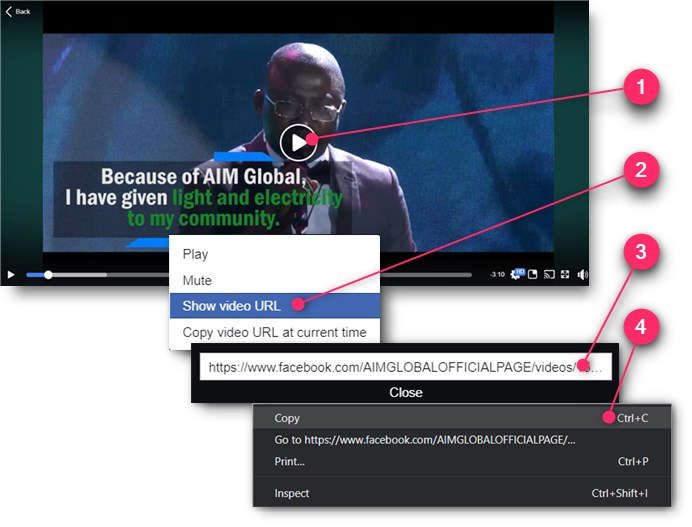
Play the video you want to download from Facebook.
Right-click on the video screen and choose the “Show video URL” option.
A small text box will open. Right-click on the video’s web address URL.
Choose the “Copy” option so it will be ready to be pasted later.
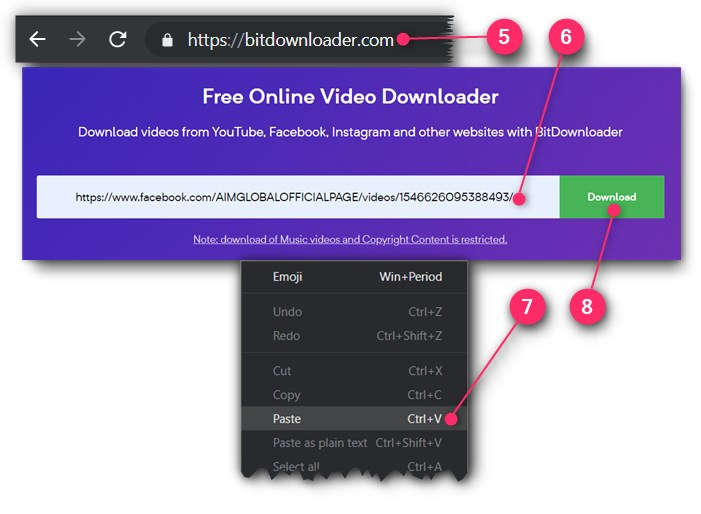
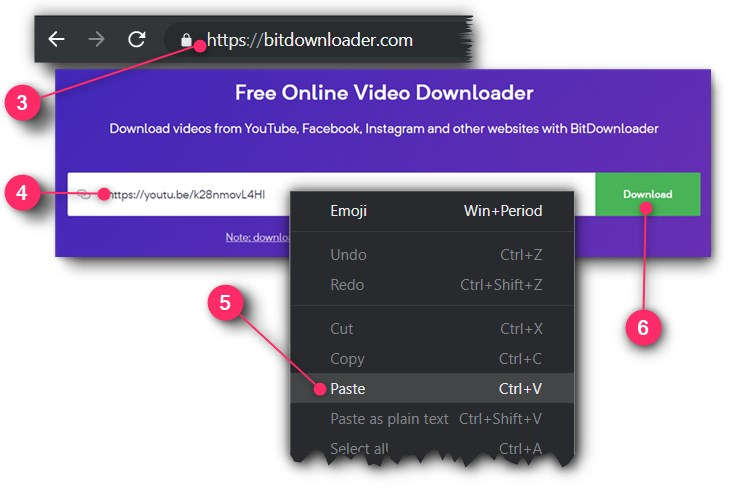
Choose the “Paste” option to paste the video’s web address URL you’ve just copied earlier.
Click the “Download” button.
BITDOWNLOADER NOT WORKING?
Try an alternative site www.getfvid.com
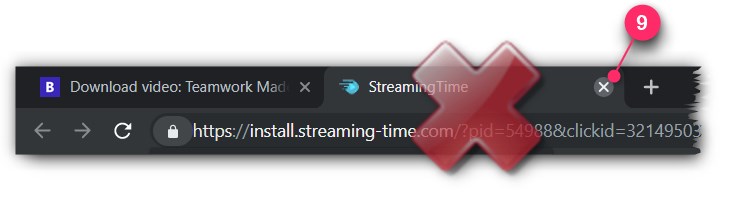
If it will open another tab window (which is annoying!), simply close it because it’s really an ad.
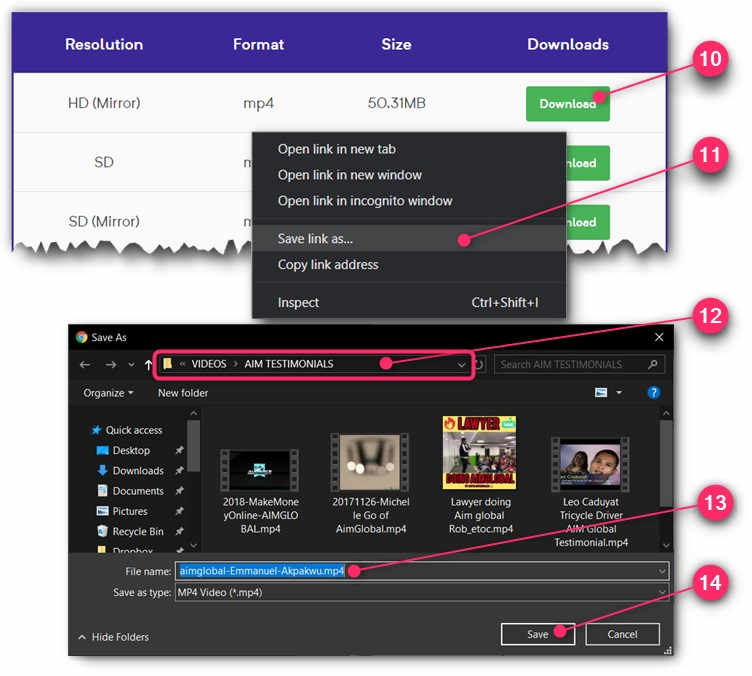
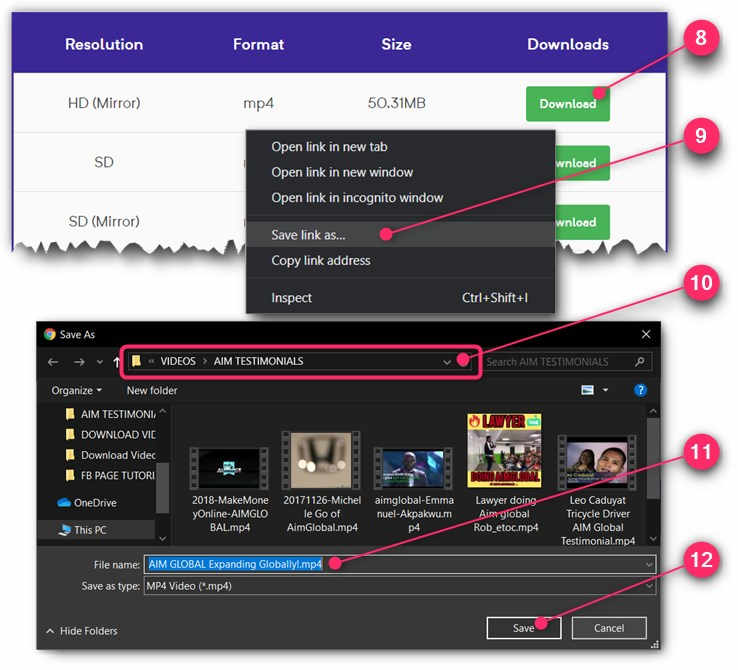
Right-click on the top “Download” button.
Choose “Save link as…” option.
Navigate to (or just remember) which folder you want your video to be saved. Remember it’s path so you will know where you will get the video for your editing or re-uploading later.
Edit the file name for your video. Change it to something that you can easily remember.
Click the “Save” button.
Congratulations! You now know how to download videos from Facebook.
Which Facebook Page to download videos from?
For your AIM Global business you can follow these steps:
WARNING!
Do not infringe copyrights as you will surely get into trouble. You should only download videos that are safe to use. These safe videos are those either (1) you created your self, (2) you bought the rights to use, (3) listed in the public domain, or (4) you have permission to use.
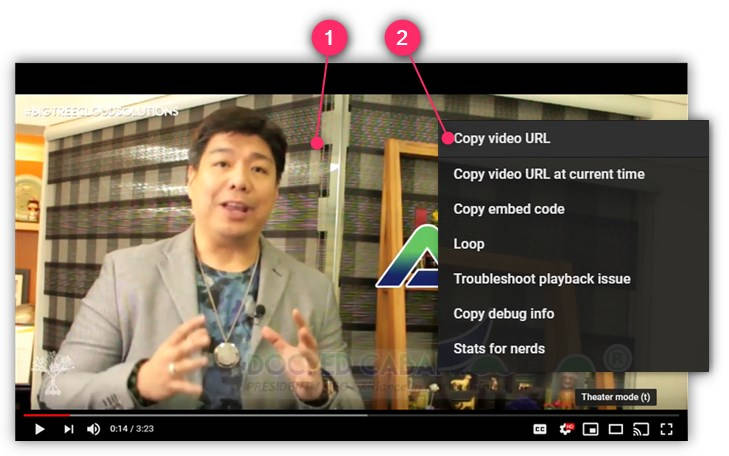
Play the video you want to download from YouTube.
Right-click on the video screen and choose the “Copy video URL” option.
Choose the “Paste” option to paste the video’s web address URL you’ve just copied earlier.
Click the “Download” button.
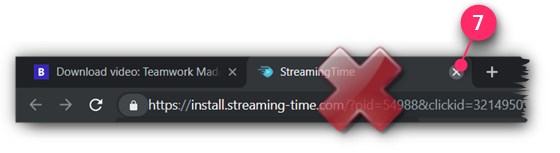
If it will open another tab window (which is annoying!), simply close it because it’s really an ad.
Right-click on the top “Download” button.
Choose “Save link as…” option.
Navigate to (or just remember) which folder you want your video to be saved. Remember it’s path so you will know where you will get the video for your editing or re-uploading later.
Edit the file name for your video. Change it to something that you can easily remember.
Click the “Save” button.
Congratulations! You now know how to download videos from YouTube.
Which YouTube channel to download videos from?
For your AIM Global business, here is the path to the official YouTube channel of AIM Global:
According to survey, videos are more effective than images when getting attention.
Since more attention will mean that you will get more clicks to your Affiliate Links. It’s a “no-brainer” then that you should always use videos to get clicks to your Affiliate Links when ever you can. But where to get your videos?
You can get your videos by creating them your self, or simply downloading them from the web. In this article I will show you to download videos from Youtube and Facebook.
WARNING!
Do not infringe copyrights as you will surely get into trouble. You should only download videos that are safe to use. These safe videos are those either (1) you created your self, (2) you bought the rights to use, (3) listed in the public domain, or (4) you have permission to use.
Install Viddly (for Windows PC)
First thing you need to have installed in your computer is Viddly, a free software to download videos.
Also, as a side note, if you prefer not installing a software in your computer, you can instead use a FREE online downloading service like BitDownloader.
Here’s how to download and install Viddly:
Go to https://vidd.ly and click the “Download Viddly Free” button.
Once download is complete, click the scroll up “^” button on your Taskbar.
Click the “Open” option. Your computer will ask if you will allow install, just click the “Yes” button.
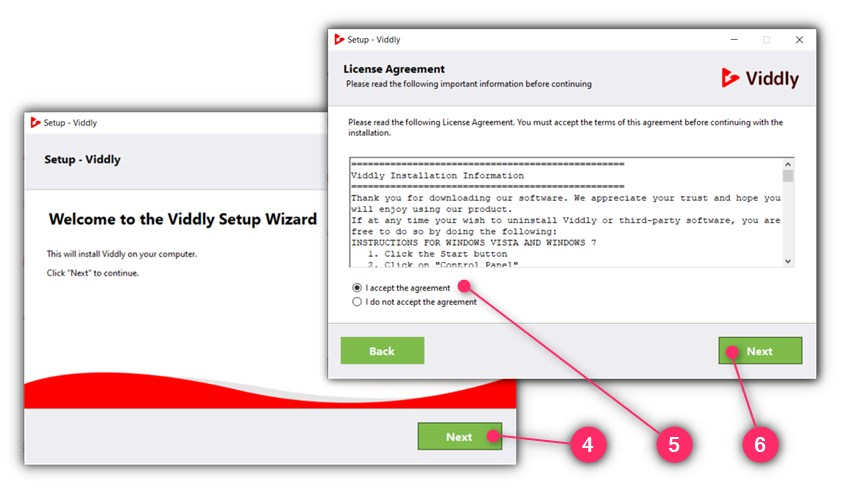
The Setup Wizard will initialize. Click the “Next” button.
Make sure the “I accept the agreement” has been checked if you agree with License Agreement.
Click the “Next” button.
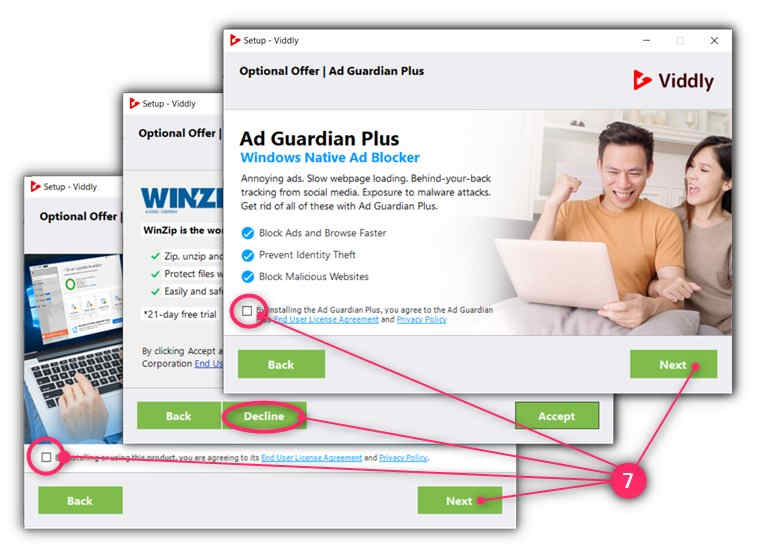
Decline all the Optional Offers that you don’t really need. You decline by removing the check mark on each radio buttons, or in some cases by clicking the “Decline” button. Click “Next” button only when appropriate.
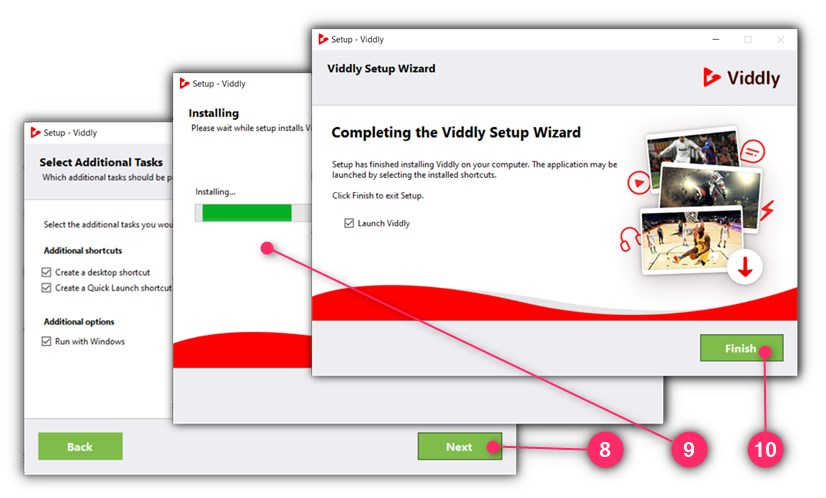
Click “Next” button after choosing your preferred options.
Wait for the setup and installation process to complete.
When installation is complete, click the “Finish” button
Congratulations! Viddly is now installed in your computer.
How to Download Youtube Videos Using Viddly
Here’s how you can download videos from Youtube anytime you want:
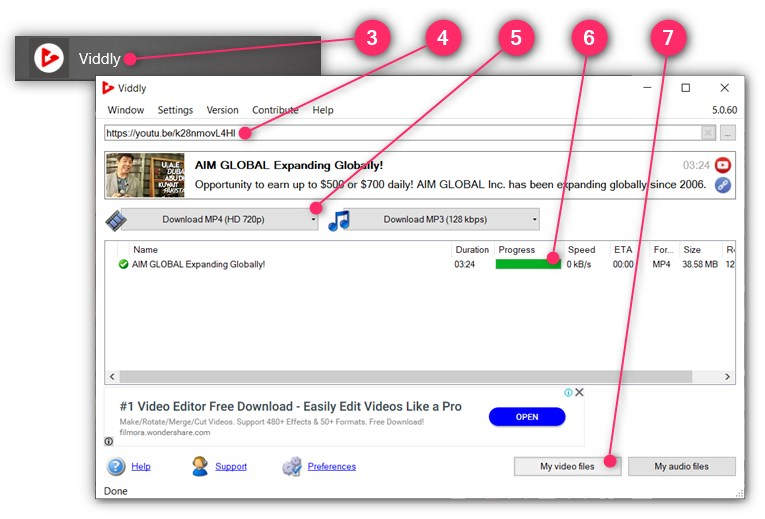
Play the Youtube video that you want to download.
Right-click on the video screen and choose the “Copy video URL” option.
From your computer, launch Viddly software.
On the search field, “Paste” the video URL you copied in step 2 above.
Wait for the video options to load, then click the “Download MP4 …” button.
Wait for the “Progress” bar to be full.
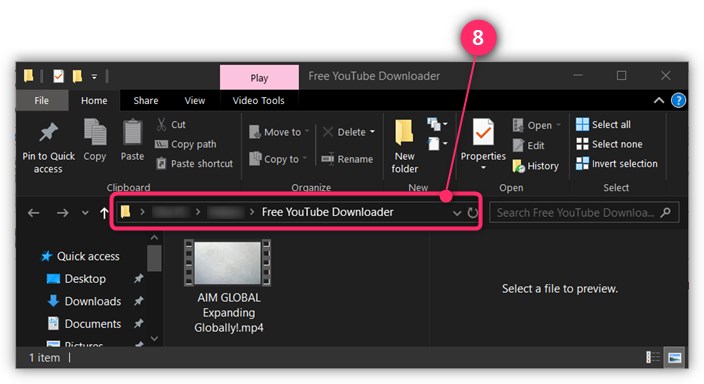
Click the “My video files“button. It will launch the File Browser to show you where the video has been saved in your computer.
Remember the path where the video was saved so you know where to get it when it’s time for you to edit or upload it.
In this post, I will show you the step-by-step on how to create and set-up a Facebook Fan page for your business. But first, let us ask why you need one.
Why Have a Facebook Business Page?
As of writing, Facebook has over 2.19 billion monthly active users worldwide, so no serious Business out there will not have their own Facebook Business Page to get more market reach.
For your AIM Global business, you will use Facebook Business Page to post all marketing campaigns that include your Affiliate Links so you can earn sales commissions (and recruit downlines if you are already a Distributor member) —even without paying for Facebook Ads until you are ready.
The real idea of having a Facebook Business Page is to allow you to build a growing number of followers including those who are not in your Facebook friends list. Having your followers grow in huge number and in one place it’s much easier for you to launch laser targeted marketing campaigns, like posting your Affiliate Links, therefore you can expect better conversions or profit.
Creating a Facebook Business Page is free and it’s really easy to do.
So let’s get started…
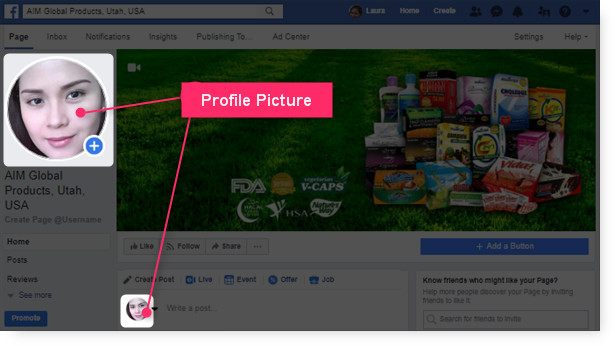
Step 1: Prepare Your Profile Picture
Your Facebook Page will need you to upload your Profile Picture. The Profile Picture is going to be shown in public and identifies you as the Page administrator or the author when you are commenting.
Profile Picture in Your Facebook Page
So have a picture of you ready to be uploaded from your computer.
The ideal Facebook profile photo size is 360 x 360 pixels.
For your AIMGLOBAL business, I suggest that your Profile Picture should project you as competent, likable and influential. To test how your Profile Picture will come across to people you can use Photofeeler.
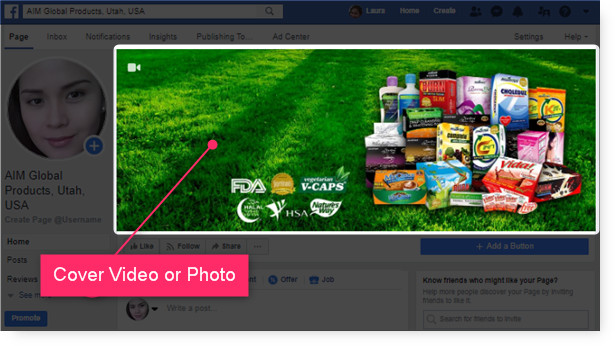
Step 2: Prepare Your Cover Video or Photo
Your Facebook Page will also need you to upload a Cover Video or Photo. Usually you show here what your Page is all about.
Cover Video or Photo in Your Facebook Page
So have a Cover Video or Photo ready to be uploaded from your computer.
For a Cover Photo, optimize it to the right dimensions: 851 pixels wide and 315 pixels tall for desktop, 640 pixels wide by 360 pixels tall for mobile. If your uploaded image is smaller than these dimensions, Facebook will stretch it to fit — making it look blurry.
WHERE TO GET FREE IMAGES?
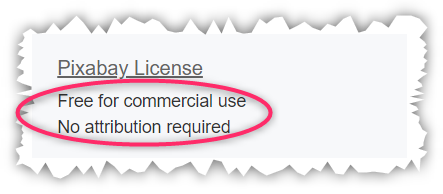
You can get free images from https://pixabay.com
Just make sure that you will choose images that can be used for commercial use and requires no attribution.
For a Cover Video, Facebook currently supports videos that are between 20 and 90 seconds long, and a minimum of 820 pixels wide by 320 pixels tall.
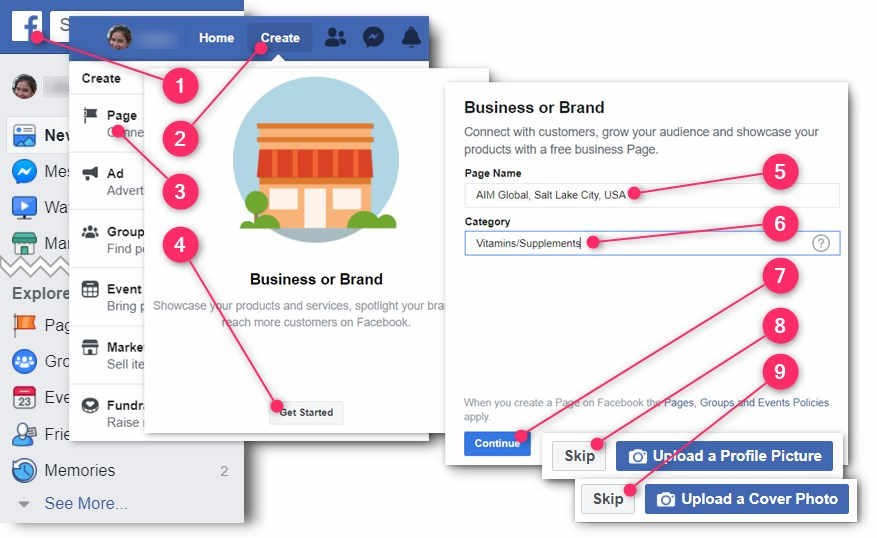
Choose the “Business or Brand” type by clicking its “Get Started” button.
Type-in the Page Name for your business.
For your AIMGLOBAL business I strongly suggest the following format: AIM Global, City Name, Country Name.
So for example, if your targeting the people of Lagos City in Nigeria, you should type-in
“AIM Global, Lagos City, Nigeria”.
For my case, I typed-in “AIM Global, Salt Lake City, USA”.
Under the Category field, type-in the industry of your business.
For your AIMGLOBAL business I strongly suggest that you put “Vitamins/Supplements“.
Click the “Continue” button.
Click the “Skip” button for now because you will upload the Profile Picture in the following steps so you can also learn how to change it.
Click the “Skip” button because you will upload the Cover Video or Photo in the following steps so you can also learn how to change it.
Step 4: Change Your Profile Photo
Here’s how you can change your current profile photo:
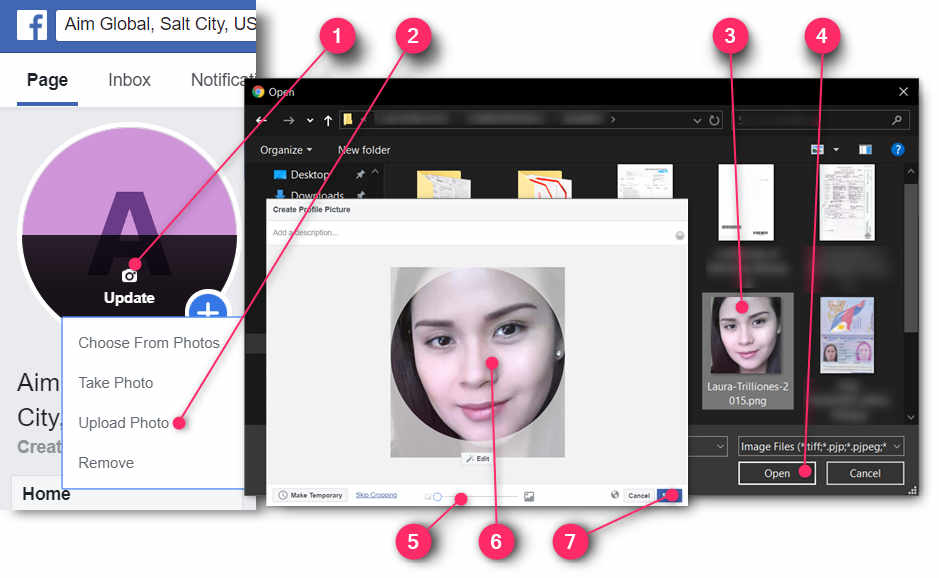
How to Change Your Fan Page Profile Photo
Hover your mouse on the current Profile Photo of your Fan Page so you can click the “Update” button.
Click the “Upload Photo” option.
Your computer’s file explorer will launch. Locate and click the photo that you want to upload.
Click the “Open” button.
An image editor will open. Use the slider to adjust the size of your photo.
Drag your photo to reposition.
Click the “Save” button.
Step 5: Change Your Cover Photo or Video
Here’s how you can change your Fan Page cover photo or video:
How to Change Your Fan Page Cover Photo
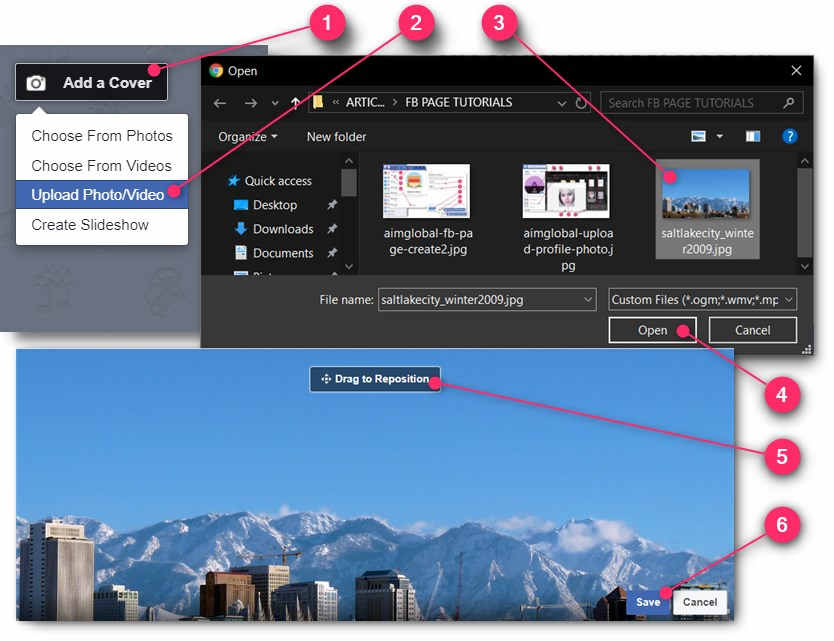
Hover your mouse to the current Cover Photo or Video of your Fan Page so you can click the “Add a Cover” or “Change Cover” button.
Click the “Upload Photo/Video” option.
Your computer’s file explorer will launch. Locate and click the photo or video that you want to upload.
Click the “Open” button.
An image editor will open. Drag the photo or video to reposition.
Click the “Save” button.
Step 6: Assign a Page Username
To make it easier for people to find your fan page, you would need to assign it a username.
Here’s how:
Assigning a Username for Your Fan Page
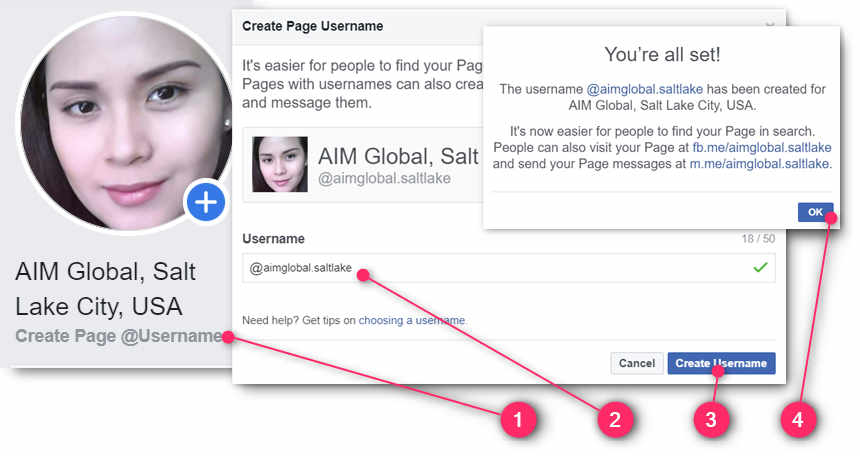
Just under your profile photo, click the “Create Page @username” link.
In the Username field, type-in a username for your fan page. Allowed characters only include alpha numeric and a dot symbol. For your AIM Global business I suggest that your fan page username is something like this: “aimglobal.cityname”. For example, since I am targeting Salt Lake City, my fan page username is “aimglobal-saltlake”.
Click the “Create Username” button.
On the success message, click the “OK” button.
Step 7: Add a Call to Action Button
The Call to Action button sits prominently just at the bottom of your Fan Page cover photo or video. So it’s a good opportunity to get clicks to your affiliate link through this button.
Here’s how to add your call to action button:
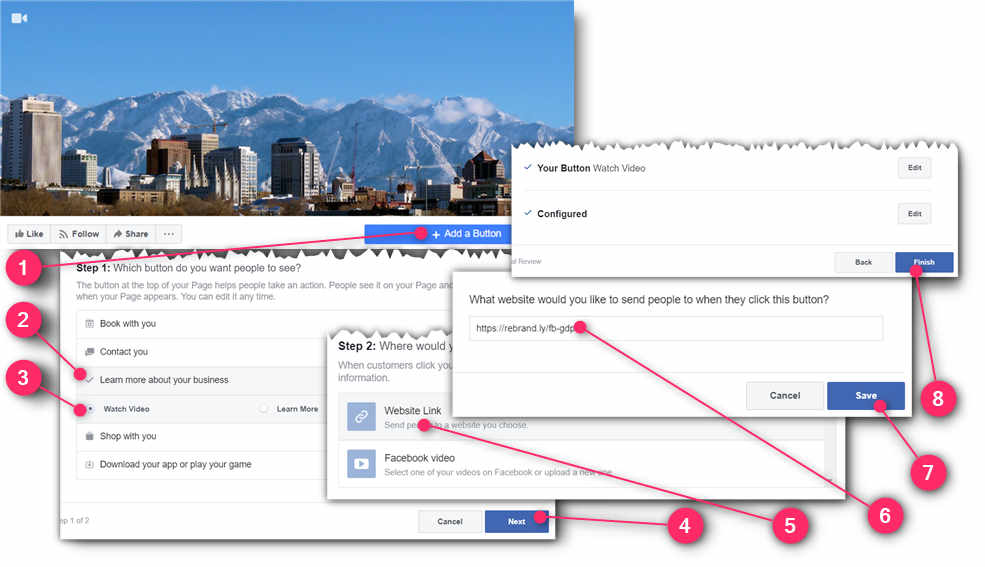
Just below your cover photo or video, click the “Add a Button” button.
Click the “Learn more about your business” option.
To better your chances of getting more traffic to your Fan Page, you would need to let visitors know what is your Fan Page is all about. Also, Facebook uses your Fan Page Information to recommend to Facebook users who shares the same interest.
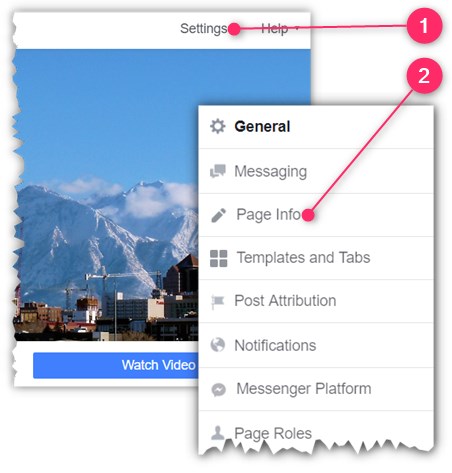
Just above your Cover Photo or Video, click the “Settings” link.
Click the “Page Info” option.
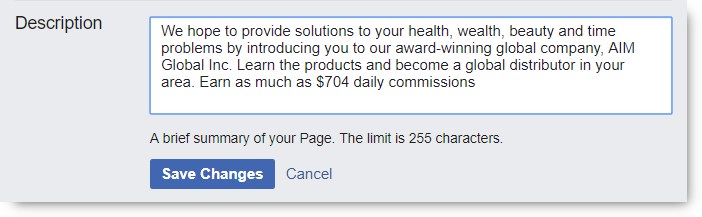
Write Your Description
Under the Description field you type-in some text to describe your page.
Don’t forget to hit the “Save” button when done.
The Description Section
For your AIM Global business, you can just copy and paste the texts inside the box below: (On your keyboard press CTRL+A to select the whole texts, CTRL+C to copy, and CTRL+V to paste)
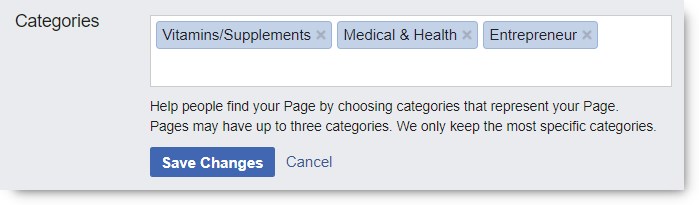
Add 2 More Categories
Under the Categories section you are allowed to have a total of 3 categories.
Don’t forget to hit the “Save” button when done.
The Categories Section
For your AIM Global business, I suggest you add the categories: “Medical & Health” and “Entrepreneur”.
Type-in Your Phone Number
Under the Phone Number section, put your own contact number.
Don’t forget to hit the “Save” button when done.
The Phone Number Section
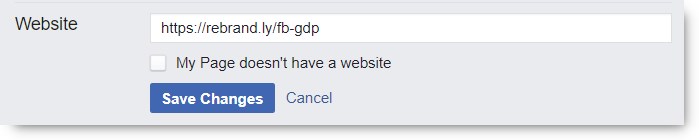
Type-in Your Website
Under the Website section, put your website address URL.
Under the Email section, put your email address. Make sure it’s your main email address -the one you always open everyday.
Or you can use sales@aimglobalproducts.com if you don’t check your email everyday.
Don’t forget to hit the “Save” button when done.
The Email Section
Type-in Your Address
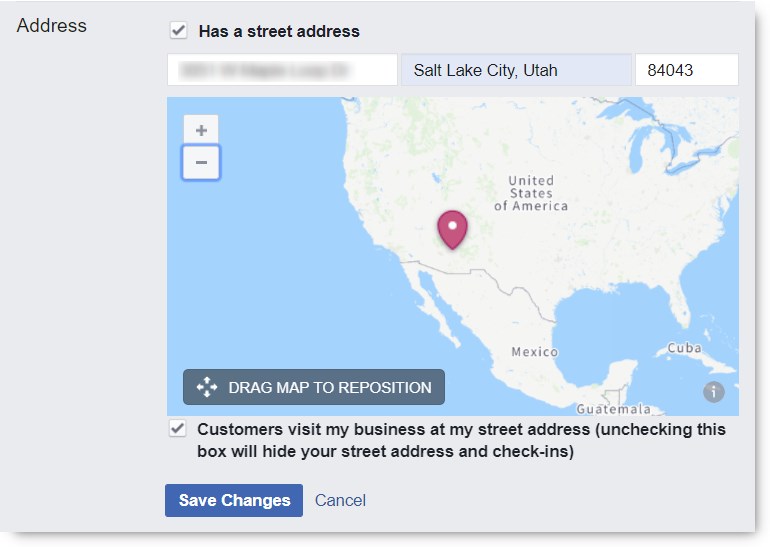
Under the Address section, put your office or business address. This is the address you are comfortable with in meeting people in person for your business.
Don’t forget to hit the “Save” button when done.
The Address Section
Type-in Your Impressum
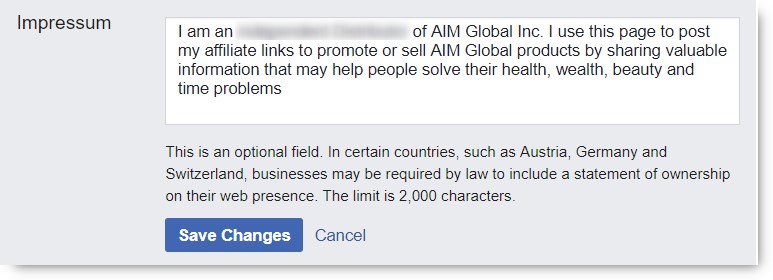
Under the Impressum section, put your statement of ownership of the business page.
Don’t forget to hit the “Save” button when done.
The Impressum Section
For your AIM Global business, you can just copy and paste the texts inside the box below. Do not mislead people by not indicating your true membership role with AIM Global. Therefore indicate if you are just an Affiliate Marketer or a full pledge Independent Distributor already. (On your keyboard press CTRL+A to select the whole texts, CTRL+C to copy, and CTRL+V to paste)
Type-in Your Products
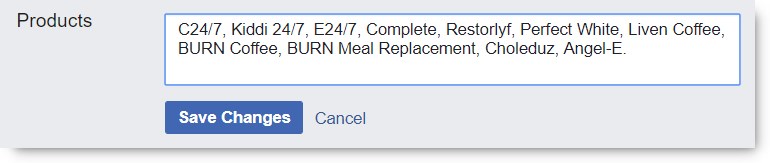
Under the Products section, put a list of your products.
Don’t forget to hit the “Save” button when done.
The Products Section
For your AIM Global business, you can just copy and paste the texts inside the box below. (On your keyboard press CTRL+A to select the whole texts, CTRL+C to copy, and CTRL+V to paste)
What’s Next?
First up, is congratulations! You really deserve a tap on the back for achieving a milestone in your business coming up to this point. Now you have a good canvass to paint on for your business campaigns. Now you are ready to post your Affiliate Links and invite more people to your business page, and slowly but surely build your strong customer base.
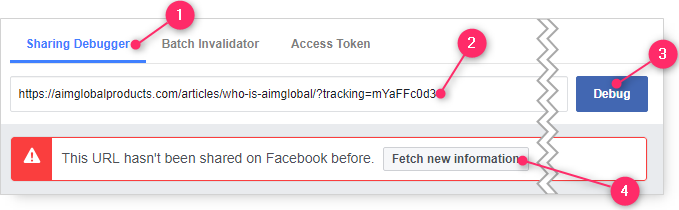
Before sharing or posting any of your Affiliate Link on Facebook, you first need to debug it. Because if you don’t, the featured image in your post will not show up. Without a featured image, your post will not stand out and will surely fail to attract many people to click your post.
In the form field, paste your Affiliate Link. You do this by right-click and choosing “Paste“.
Scroll page to the right to find and click the “Debug” button
Click the “Fetch new information” button, and it should show the featured image when you scroll down the page.
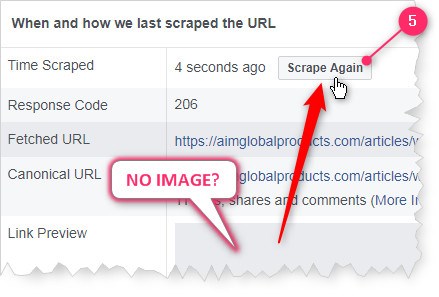
Is the featured image not showing? Don’t worry, just click the “Scrape Again” button. Scraping Again When There’s No Image Showing
Facebook Post Samples:
When there are already images showing for your Affiliate Link, you can then paste it on your Facebook Timeline, Facebook Fan Pages, Facebook Group and Messenger Chats –but before you do, write an attention grabbing ad texts before it!
You can “copy and paste” the ad texts from the sample posts below, just don’t forget to add your debugged Affiliate Link at the end!
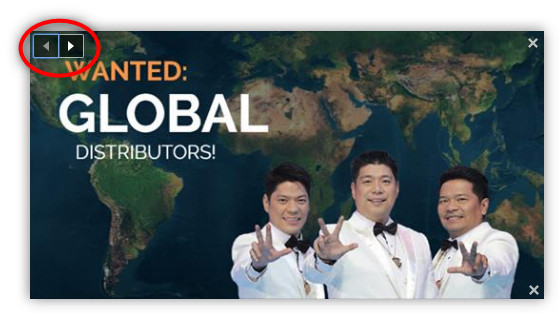
Did you notice that they have different featured image? That’s because you can choose from the different fetched images the one you prefer to be featured in your post. You just need to click the left or right arrows to select through before hitting the “Post” button. See illustration below:
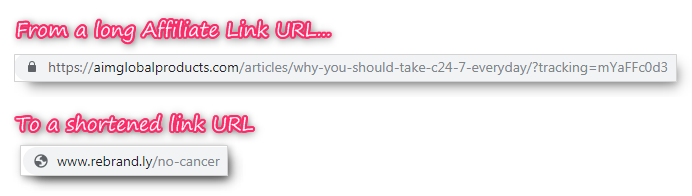
Your default Affiliate Link URL[URL meaning], as discussed in the previous lesson, consist of 2 parts. Being as it is, can be a long line of text characters. However, it can be shortened (while preserving the purpose) as illustrated below:
URL stands for Uniform Resource Locator.
It’s just a “web address” but called in a fancy way by computer programmers.
In actual fact, a shortened URL is just a “forwarder” that forwards people to the intended web address –which is in this case is your Affiliate Link URL.
Why Shorten Your Affiliate Links?
There are 4 important reasons why shorten your Affiliate Link:
To hide the main web address. Your default Affiliate Link shows the core web address where, if your prospect will prefer, can just type it in without your Tracking Script (instead of clicking it). This is called, “by-passing.” As you already know, without your Tracking Script when they visit AimGlobalProducts.com site, it can be impossible to associate you as the referrer of the resulting sale.
To fit it in your offline campaigns. Your default Affiliate Links can be quite long for a particular strategy that you’d want to do. For example, your default Affiliate Link is too long to be printed on your business card, flyers, posters and bumper stickers. Besides, you can’t really expect your prospects to type all the characters of your Affiliate Link just to see the details of your offer.
To make it easier to remember. In case your prospects lose your business card, you’d like them to still remember how to get to your offer.
So you can track clicks. There are URL Shortener services over the net that also allow you to see how many clicks your offer is getting. This feature will make way for you to do split testing, where you have 2 or more campaign formats for a particular offer, and identify which campaign is the most effective one.
How to Shorten Your Affiliate Links
There are basically 2 options to shorten your Affiliate Links:
By purchasing your own domain name
By using a free URL shortener service
Method 1: By Purchasing Your own Domain Name
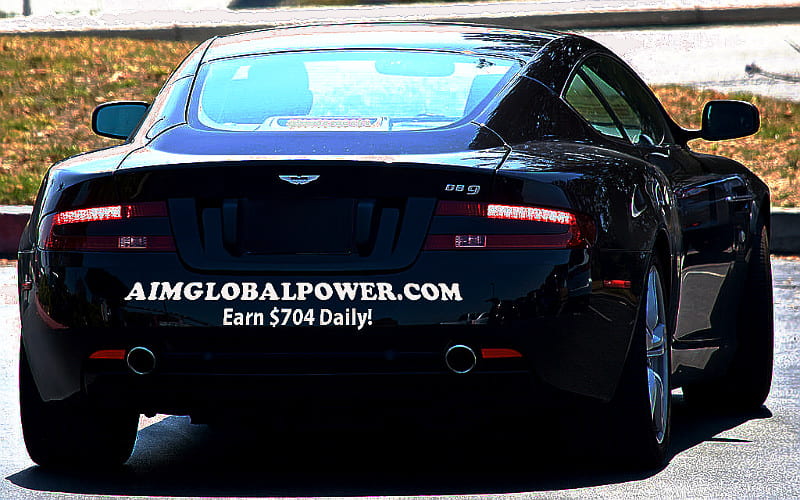
You can buy a domain name from a domain name registrar, such as Namecheap.com, and have your domain name point/forward to the Affiliate Link of your choice. For example, I have purchased the domain name www.AimGlobalPower.com and have it point to my affiliate link for the Main capture page.
Since it’s a top domain name, it also looks more professional –and short enough to fit as car bumper sticker!
Image is a derivative of photo by Bill Abbott, licensed under CC BY-SA 2.0
With a URL Shortener Service you are allowed to use their own short domain name to create short links that forwards to any web address like your Affiliate Links, for example. Most URL Shortener Service out there provide you the basic service for free, with the option of paying premiums for additional features, like click tracking or link branding. For a more detailed illustration, watch the video below, from Rebrandly.com:
With Rebrandly.com you can signup for a free account –which has all the features that you will need for your Affiliate Links.
URL shortening is a very straight forward process. All you need to do is specify any of your Affiliate Links that you want to shorten –as the Destination URL, and then specify the trailing text of your shortened URL.
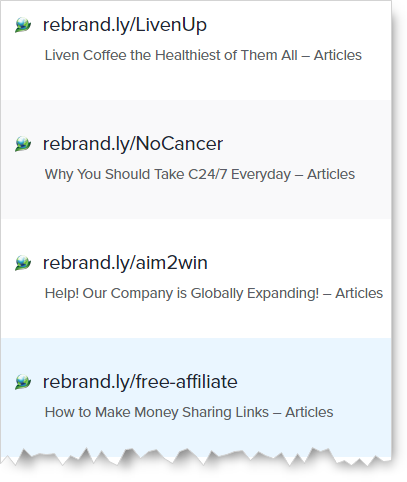
Below are some samples of the shortened URL I have created within Rebrandly.com:
The Wrap Up
The 4 important reasons why you would want to shorten your Affiliate URL links are:
to stop people by-passing your links; to make it fit in your offline campaigns like in your business card;
to make it easy to remember for your customers; and
to allow you to track clicks on your links.
In creating your shorten URL links, it is preferable to go for the shortest possible text.
There are 2 main ways to shorten your Affiliate Links, namely:
buy a domain name and create redirects to your Affiliate Links; or
When you click the “Affiliate Tracking” linked text inside your Affiliate Dashboard, you are going to be forwarded to the “Affiliate Tracking” page.
The “Affiliate Tracking” page is where you can create or generate your Affiliate Links. As you may already know, an Affiliate Link is a web address that include your Tracking Script and is pointing to a specific page or product inside AimGlobalProducts.com website so you can earn sales commissions.
Tracking Information
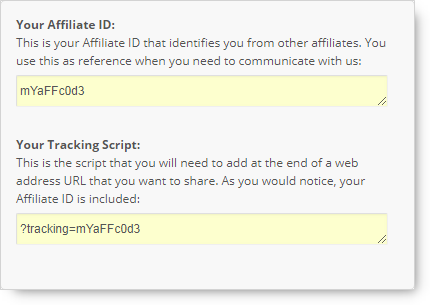
The first section that you will find inside your Tracking Page is your Tracking Information which shows your Affiliate ID and your Tracking Script.
As you would understand by now, your Tracking Script is what you will paste at the end of the web address, within AimGlobalProducts.com, that you want people to visit. This topic is explained in detail in the next lesson.
Ready to use Affiliate Links
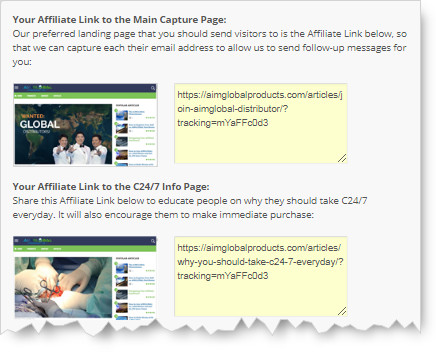
Inside the Tracking Page you will also find the section where there are “ready to use” Affiliate Links.
These “ready to use” Affiliate Links are already pointing to suggested pages and are already having your Tracking Script . All you have to do is add an ad texts when you post it for sharing. More details about ad texts in the next lesson.
Affiliate Link Generator to a Product Page
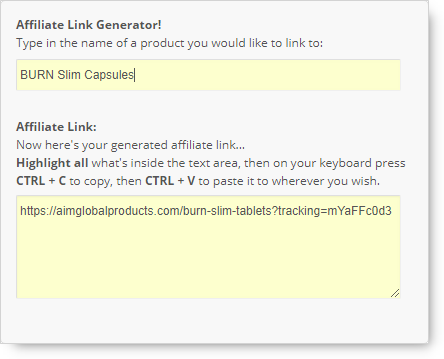
In situations that you need to promote directly to a specific product, you can generate the respective Affiliate Link using the Affiliate Link Generator section inside the Affiliate Tracking Page.
Ready to use Embed Codes
Do you have a blog or a website? In the last section of the Tracking Page you will find embed codes that you can paste in HTML as an ad banner on your web page.