
When you login to your Affiliate Account, here’s what your Affiliate Dashboard looks like:
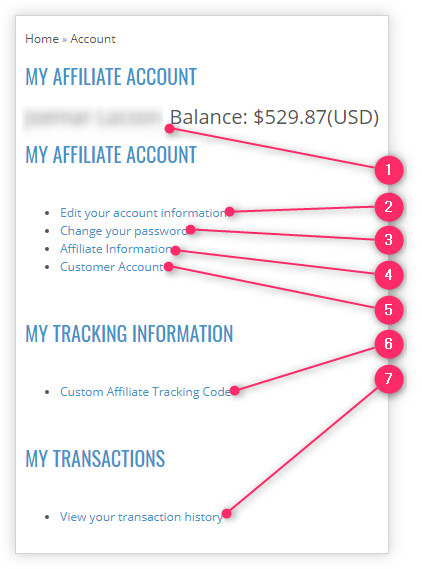
- Straight away you will see your Full Name and the Balance of your earned commissions.
- Edit your account information – is where you can modify or update your personal details, such as your First Name, Last Name, E-mail and Telephone.
- Change your password – is where you can modify your existing password.
- Affiliate Information – is where you can modify or update details such as your Web Site, Tax ID and details of your preferred Payment Method.
- Customer Account – is where you can go back to your Customer Account dashboard.
- Custom Affiliate Tracking Code – or simply called “Affiliate Tracking,” is where you can create your Affiliate Links.
- View your transaction history – is where you can view the transaction history related to your earned commissions. It is also where you can transfer your Affiliate Earnings to your Customer Account so you can use the money to buy products from the eShop.
Lessons page
Comments
2 responses to “Navigating Your Affiliate Dashboard”
Am new here so how will I get started ie how will I start to earn
Hi Miracle,
In affiliate marketing, you earn commissions from the purchases of your referred customers. These customers are those who were introduced to our online shop when they have clicked your affiliate link. For further details, continue to learn the following lesson.