You have already created a Facebook Group for your chosen niche.
You already have an active Affiliate Account in our online shop.
You have already posted at least 20 different campaigns on your Facebook Fan Page and Facebook Group. A campaign (or offer) is a post that include valuable information for your customers, and your affiliate link for them to click when they want to learn more about your campaign. A campaign is not effective if it does not compel your prospect to click your affiliate link. Therefore you should take your campaigns very seriously, because your income in this business starts to get more real from this. An effective campaign should have the following qualities:
It should show a clear picture or a video
It should show how you are proposing to solve your customer’s problems
It should show that your customers will definitely get value if they just click your affiliate link
It should show a “call to action” to click your affiliate link
The Steps
1. Join many Facebook Groups that are related to your target niche.
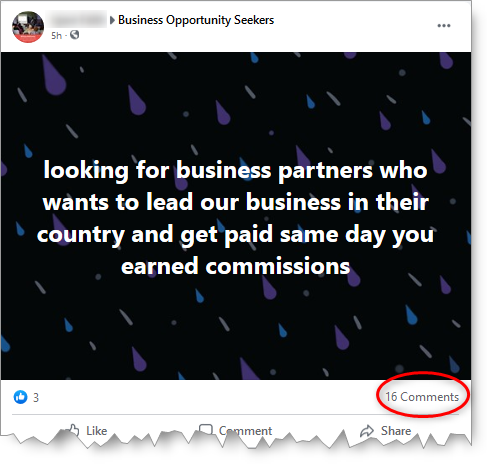
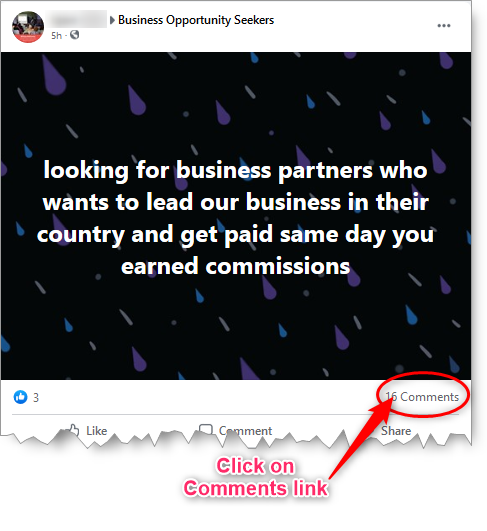
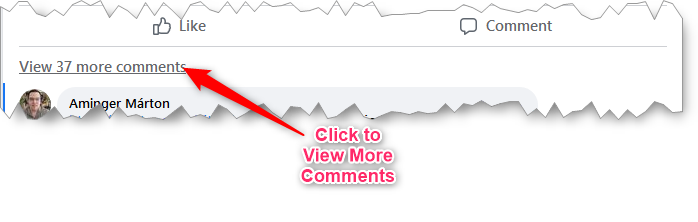
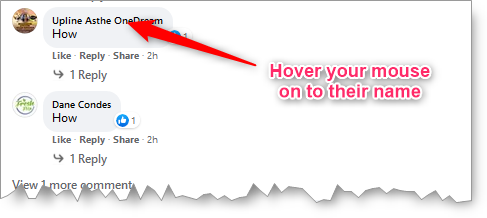
2. Once joined, you look for posts within that has people responding to the post. Please note that this post is not necessarily you have created yourself; it could be someone else’s post.
For example:
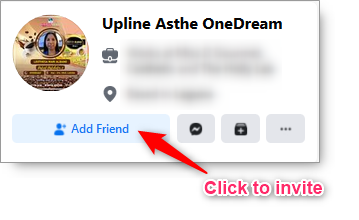
3. “Add Friend” each responding people who are legitimately interested. Do not add those who are just responding to promote their own business as they will most likely spam you with their own campaigns.
Here’s how to do it:
Look for those who were asking for more information, so you can invite them to be your friends.
Usually, they comment “How” or “More Info”.
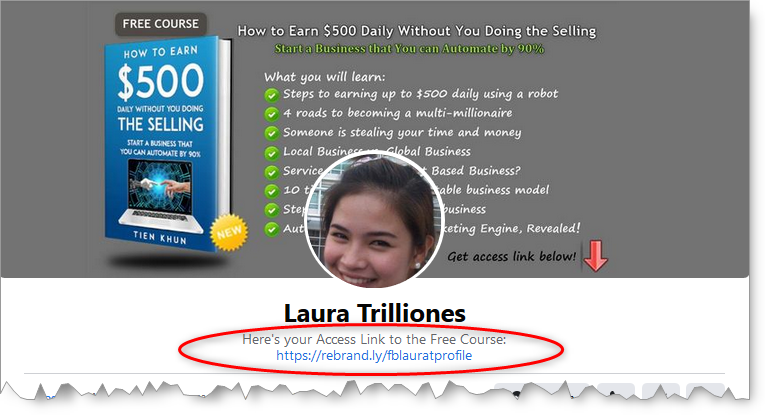
Please bear in mind that these people you have invited to be friends with in Facebook would most likely check out your own Facebook Profile first before deciding. So it is therefore a good idea that you have your Profile Page already inviting them to your affiliate link.
For example, here’s the Profile Page of one of our co-members showing an opportunity for the viewer to get a free course by clicking her affiliate link:
4. Once you have enough new Facebook Friends after doing many times as above, you then go to your Facebook Fan Page to invite them to like your page.
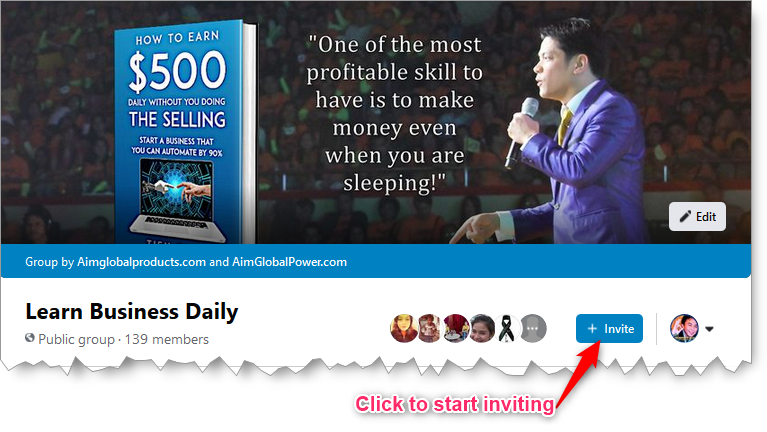
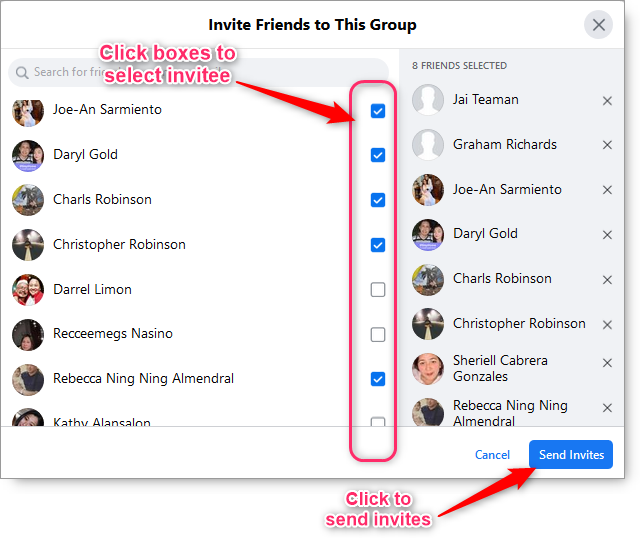
5. You also invite them to your Facebook Group.
For example, I have just started a Facebook Group targeting the wealth niche. All I have to do is invite my new friends to join it.
Expectations
If you continue to do this strategy everyday, then you can expect the following scenario’s.
If you are able to make, say 15 people everyday, to successfully join your Facebook Group, then you can expect to have collected 5,475 targeted potential customers in a year per Facebook Group that you have created.
Provided that you have been posting at least 20 effective campaigns in your Facebook Group or Facebook Page. You would most likely get people clicking your affiliate links, and they will most likely share your posts/campaigns to their own friends as well.
For those who will click your Affiliate Links, they will most likely get drawn to buy your offer because when they opt-in our Mailing List, AIME system will automatically send them emails to educate and follow-up them regularly about your offers.
You should by now realize that the more people you get invited to Facebook Group or Facebook Fan Page, the more people will get to click your Affiliate Links. The more clicks to your Affiliate Links would mean more chance to have them opted-in our Mailing List so our AIME System can eventually push them to buying your offers. Basically, if you want more sales to get more income, you need to collect more and more targeted customers each day.
I hope you have learned a lot from this tutorial, and that those learning will help you generate more income in our AIM Global Business.
WARNING!
Do not infringe copyrights as you will surely get into trouble. You should only download videos that are safe to use. These safe videos are those either (1) you created your self, (2) you bought the rights to use, (3) listed in the public domain, or (4) you have permission to use.
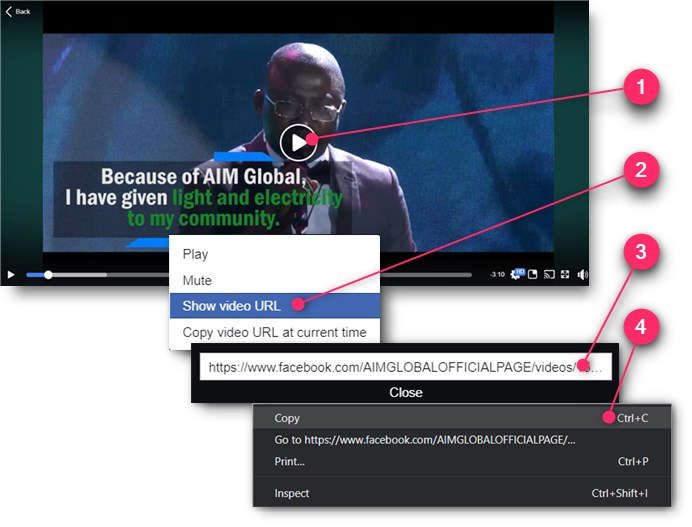
Play the video you want to download from Facebook.
Right-click on the video screen and choose the “Show video URL” option.
A small text box will open. Right-click on the video’s web address URL.
Choose the “Copy” option so it will be ready to be pasted later.
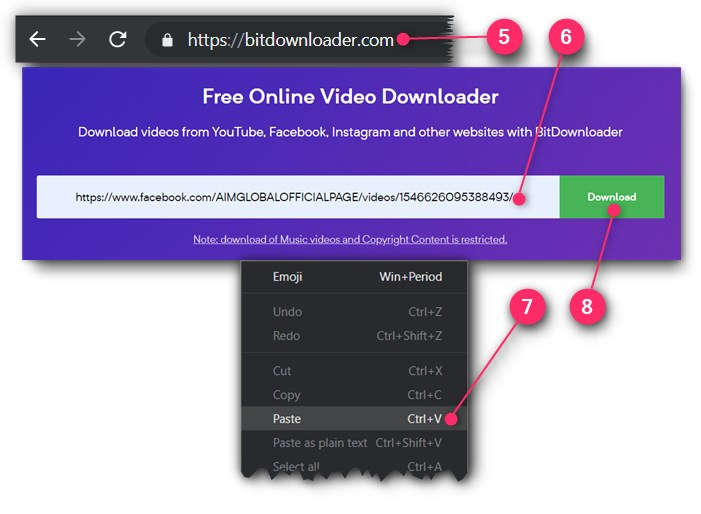
Choose the “Paste” option to paste the video’s web address URL you’ve just copied earlier.
Click the “Download” button.
BITDOWNLOADER NOT WORKING?
Try an alternative site www.getfvid.com
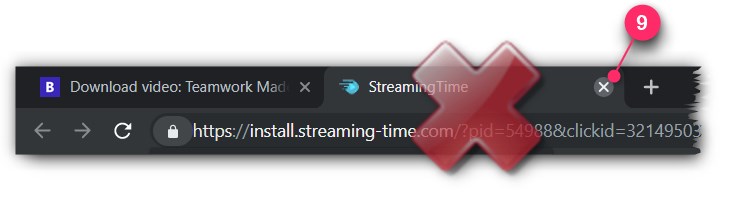
If it will open another tab window (which is annoying!), simply close it because it’s really an ad.
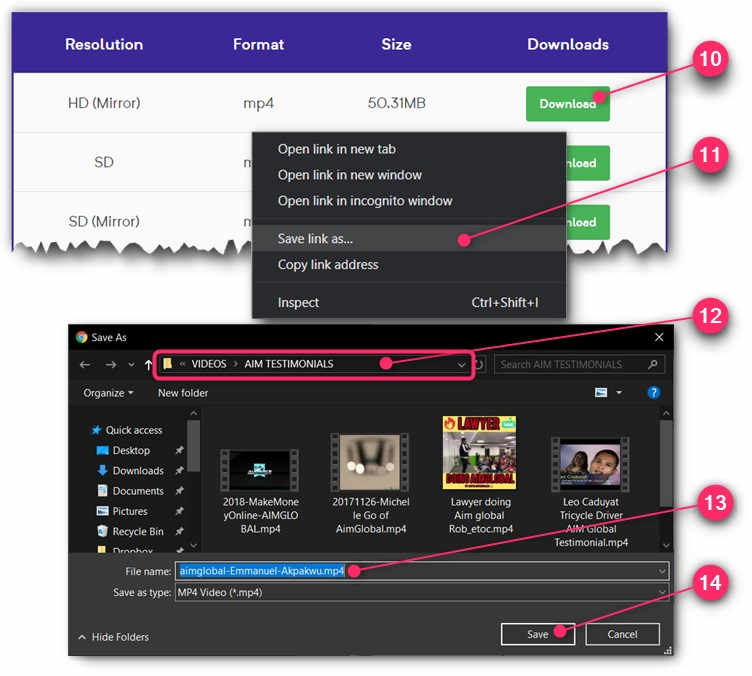
Right-click on the top “Download” button.
Choose “Save link as…” option.
Navigate to (or just remember) which folder you want your video to be saved. Remember it’s path so you will know where you will get the video for your editing or re-uploading later.
Edit the file name for your video. Change it to something that you can easily remember.
Click the “Save” button.
Congratulations! You now know how to download videos from Facebook.
Which Facebook Page to download videos from?
For your AIM Global business you can follow these steps:
According to survey, videos are more effective than images when getting attention.
Since more attention will mean that you will get more clicks to your Affiliate Links. It’s a “no-brainer” then that you should always use videos to get clicks to your Affiliate Links when ever you can. But where to get your videos?
You can get your videos by creating them your self, or simply downloading them from the web. In this article I will show you to download videos from Youtube and Facebook.
WARNING!
Do not infringe copyrights as you will surely get into trouble. You should only download videos that are safe to use. These safe videos are those either (1) you created your self, (2) you bought the rights to use, (3) listed in the public domain, or (4) you have permission to use.
Install Viddly (for Windows PC)
First thing you need to have installed in your computer is Viddly, a free software to download videos.
Also, as a side note, if you prefer not installing a software in your computer, you can instead use a FREE online downloading service like BitDownloader.
Here’s how to download and install Viddly:
Go to https://vidd.ly and click the “Download Viddly Free” button.
Once download is complete, click the scroll up “^” button on your Taskbar.
Click the “Open” option. Your computer will ask if you will allow install, just click the “Yes” button.
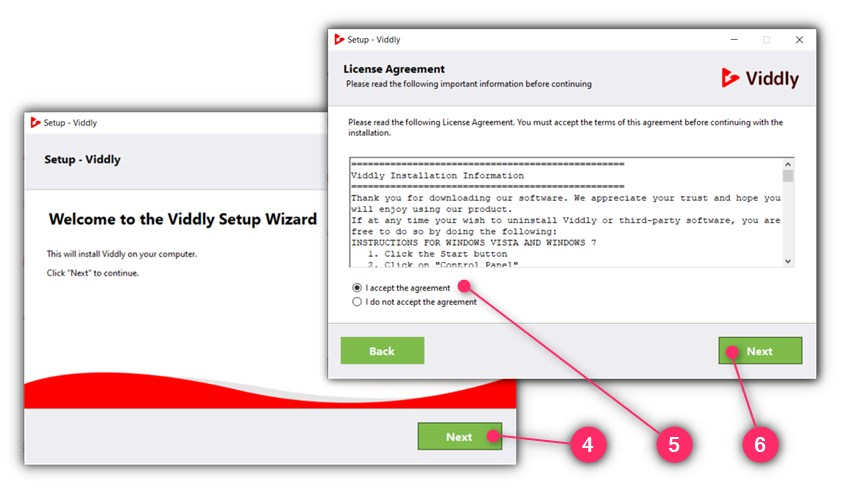
The Setup Wizard will initialize. Click the “Next” button.
Make sure the “I accept the agreement” has been checked if you agree with License Agreement.
Click the “Next” button.
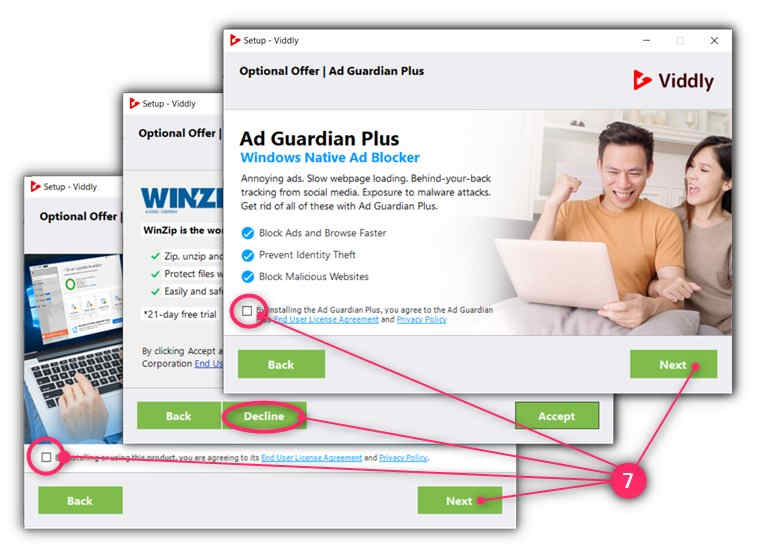
Decline all the Optional Offers that you don’t really need. You decline by removing the check mark on each radio buttons, or in some cases by clicking the “Decline” button. Click “Next” button only when appropriate.
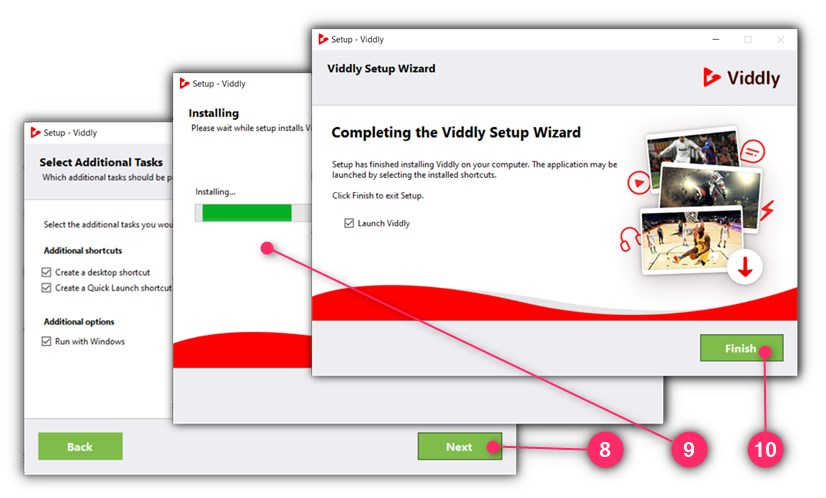
Click “Next” button after choosing your preferred options.
Wait for the setup and installation process to complete.
When installation is complete, click the “Finish” button
Congratulations! Viddly is now installed in your computer.
How to Download Youtube Videos Using Viddly
Here’s how you can download videos from Youtube anytime you want:
Play the Youtube video that you want to download.
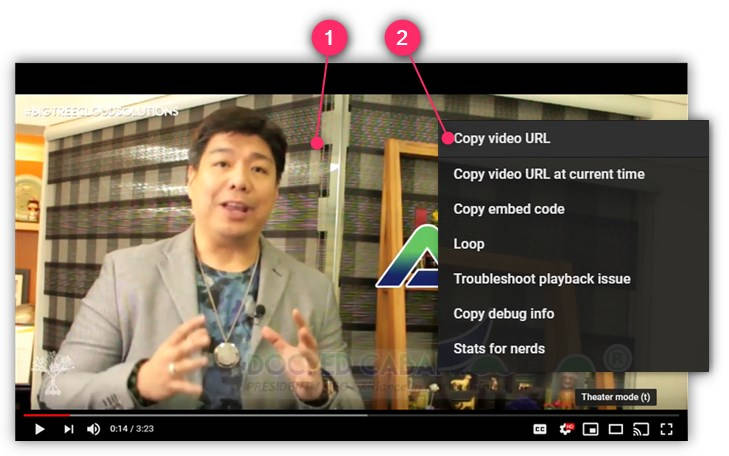
Right-click on the video screen and choose the “Copy video URL” option.
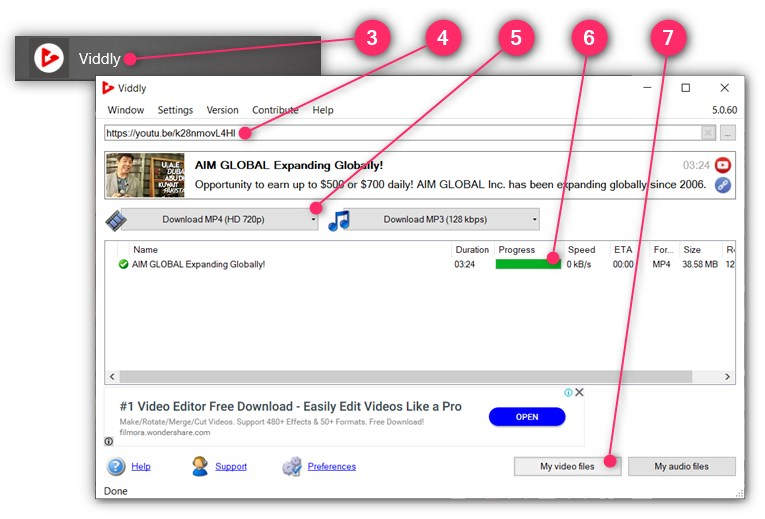
From your computer, launch Viddly software.
On the search field, “Paste” the video URL you copied in step 2 above.
Wait for the video options to load, then click the “Download MP4 …” button.
Wait for the “Progress” bar to be full.
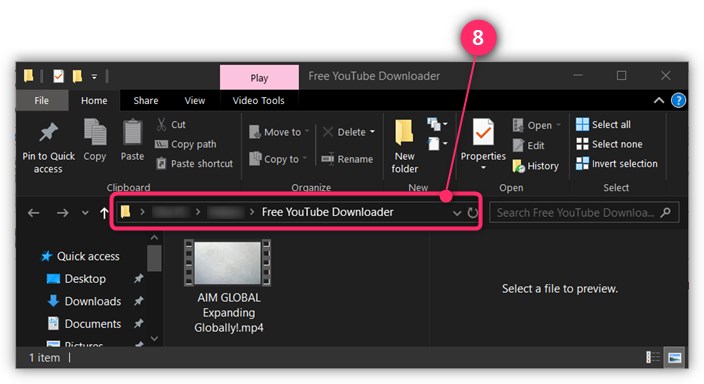
Click the “My video files“button. It will launch the File Browser to show you where the video has been saved in your computer.
Remember the path where the video was saved so you know where to get it when it’s time for you to edit or upload it.
In this post, I will show you the step-by-step on how to create and set-up a Facebook Fan page for your business. But first, let us ask why you need one.
Why Have a Facebook Business Page?
As of writing, Facebook has over 2.19 billion monthly active users worldwide, so no serious Business out there will not have their own Facebook Business Page to get more market reach.
For your AIM Global business, you will use Facebook Business Page to post all marketing campaigns that include your Affiliate Links so you can earn sales commissions (and recruit downlines if you are already a Distributor member) —even without paying for Facebook Ads until you are ready.
The real idea of having a Facebook Business Page is to allow you to build a growing number of followers including those who are not in your Facebook friends list. Having your followers grow in huge number and in one place it’s much easier for you to launch laser targeted marketing campaigns, like posting your Affiliate Links, therefore you can expect better conversions or profit.
Creating a Facebook Business Page is free and it’s really easy to do.
So let’s get started…
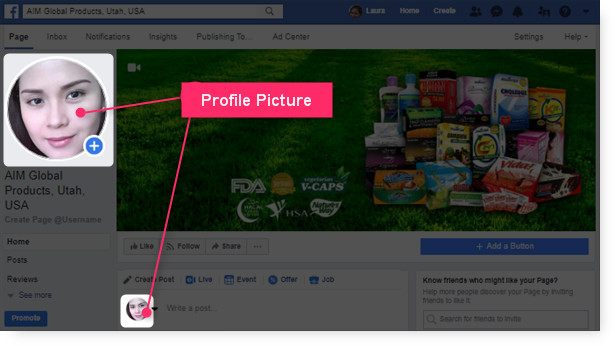
Step 1: Prepare Your Profile Picture
Your Facebook Page will need you to upload your Profile Picture. The Profile Picture is going to be shown in public and identifies you as the Page administrator or the author when you are commenting.
Profile Picture in Your Facebook Page
So have a picture of you ready to be uploaded from your computer.
The ideal Facebook profile photo size is 360 x 360 pixels.
For your AIMGLOBAL business, I suggest that your Profile Picture should project you as competent, likable and influential. To test how your Profile Picture will come across to people you can use Photofeeler.
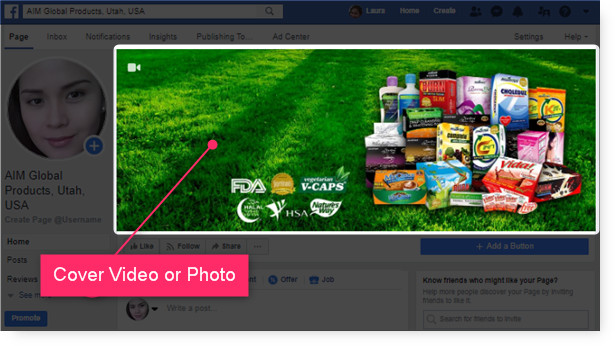
Step 2: Prepare Your Cover Video or Photo
Your Facebook Page will also need you to upload a Cover Video or Photo. Usually you show here what your Page is all about.
Cover Video or Photo in Your Facebook Page
So have a Cover Video or Photo ready to be uploaded from your computer.
For a Cover Photo, optimize it to the right dimensions: 851 pixels wide and 315 pixels tall for desktop, 640 pixels wide by 360 pixels tall for mobile. If your uploaded image is smaller than these dimensions, Facebook will stretch it to fit — making it look blurry.
WHERE TO GET FREE IMAGES?
You can get free images from https://pixabay.com
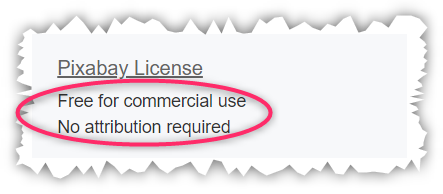
Just make sure that you will choose images that can be used for commercial use and requires no attribution.
For a Cover Video, Facebook currently supports videos that are between 20 and 90 seconds long, and a minimum of 820 pixels wide by 320 pixels tall.
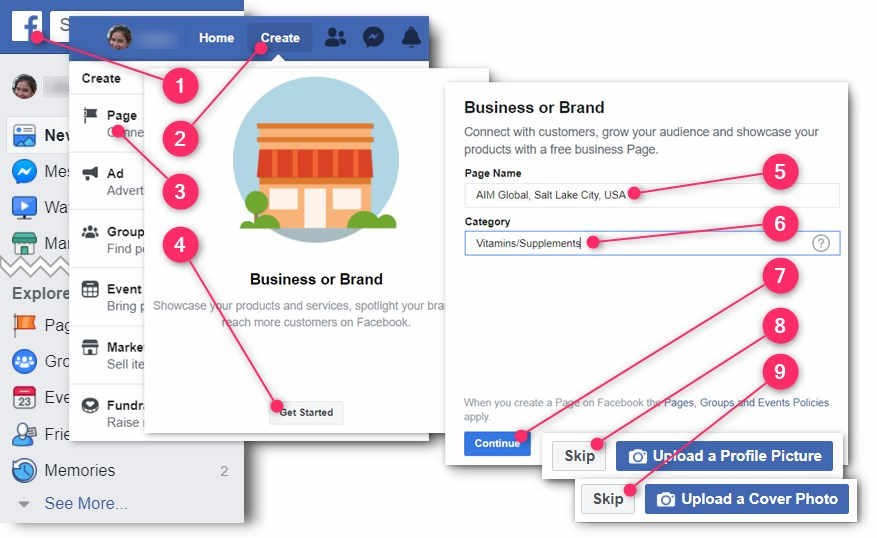
Choose the “Business or Brand” type by clicking its “Get Started” button.
Type-in the Page Name for your business.
For your AIMGLOBAL business I strongly suggest the following format: AIM Global, City Name, Country Name.
So for example, if your targeting the people of Lagos City in Nigeria, you should type-in
“AIM Global, Lagos City, Nigeria”.
For my case, I typed-in “AIM Global, Salt Lake City, USA”.
Under the Category field, type-in the industry of your business.
For your AIMGLOBAL business I strongly suggest that you put “Vitamins/Supplements“.
Click the “Continue” button.
Click the “Skip” button for now because you will upload the Profile Picture in the following steps so you can also learn how to change it.
Click the “Skip” button because you will upload the Cover Video or Photo in the following steps so you can also learn how to change it.
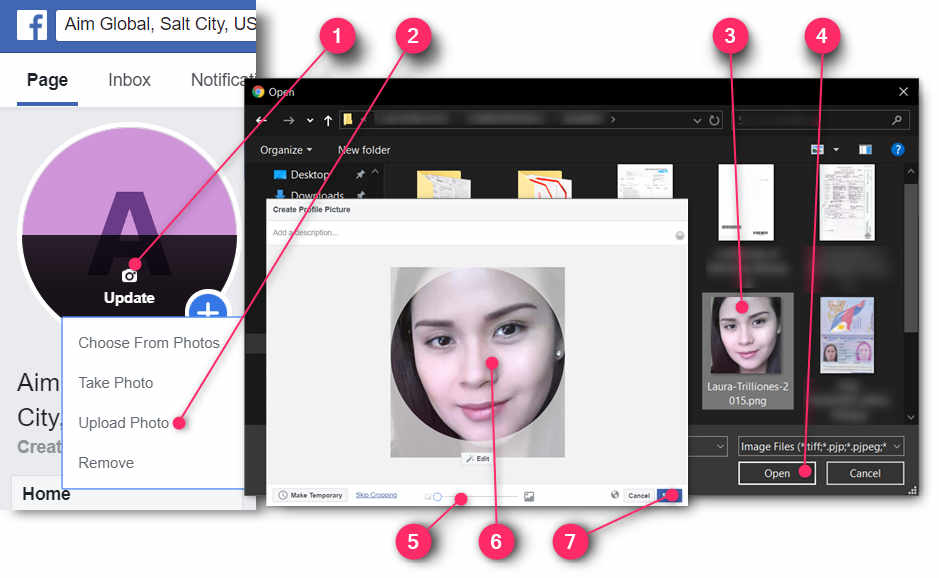
Step 4: Change Your Profile Photo
Here’s how you can change your current profile photo:
How to Change Your Fan Page Profile Photo
Hover your mouse on the current Profile Photo of your Fan Page so you can click the “Update” button.
Click the “Upload Photo” option.
Your computer’s file explorer will launch. Locate and click the photo that you want to upload.
Click the “Open” button.
An image editor will open. Use the slider to adjust the size of your photo.
Drag your photo to reposition.
Click the “Save” button.
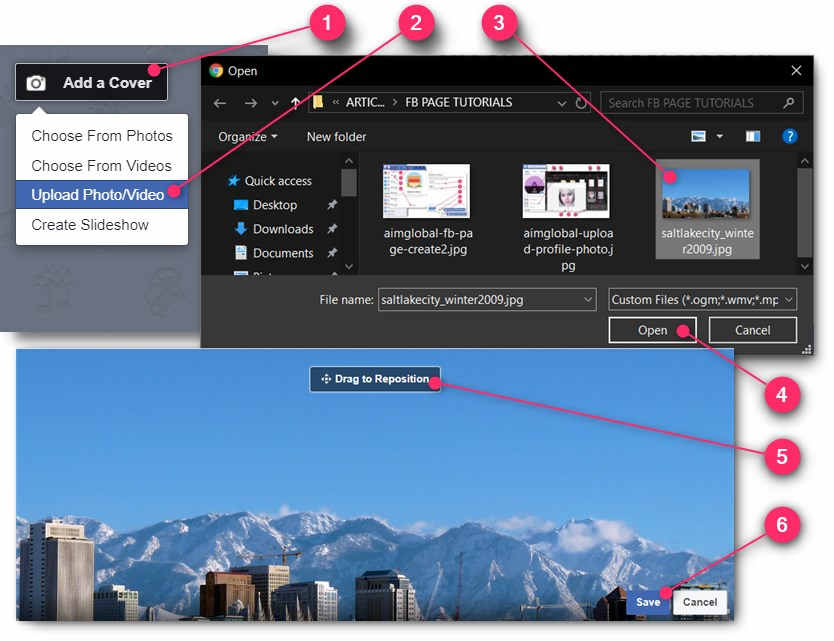
Step 5: Change Your Cover Photo or Video
Here’s how you can change your Fan Page cover photo or video:
How to Change Your Fan Page Cover Photo
Hover your mouse to the current Cover Photo or Video of your Fan Page so you can click the “Add a Cover” or “Change Cover” button.
Click the “Upload Photo/Video” option.
Your computer’s file explorer will launch. Locate and click the photo or video that you want to upload.
Click the “Open” button.
An image editor will open. Drag the photo or video to reposition.
Click the “Save” button.
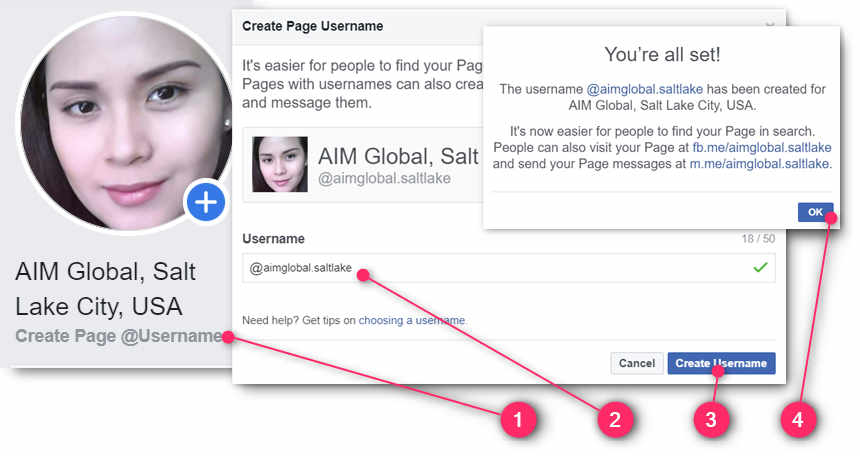
Step 6: Assign a Page Username
To make it easier for people to find your fan page, you would need to assign it a username.
Here’s how:
Assigning a Username for Your Fan Page
Just under your profile photo, click the “Create Page @username” link.
In the Username field, type-in a username for your fan page. Allowed characters only include alpha numeric and a dot symbol. For your AIM Global business I suggest that your fan page username is something like this: “aimglobal.cityname”. For example, since I am targeting Salt Lake City, my fan page username is “aimglobal-saltlake”.
Click the “Create Username” button.
On the success message, click the “OK” button.
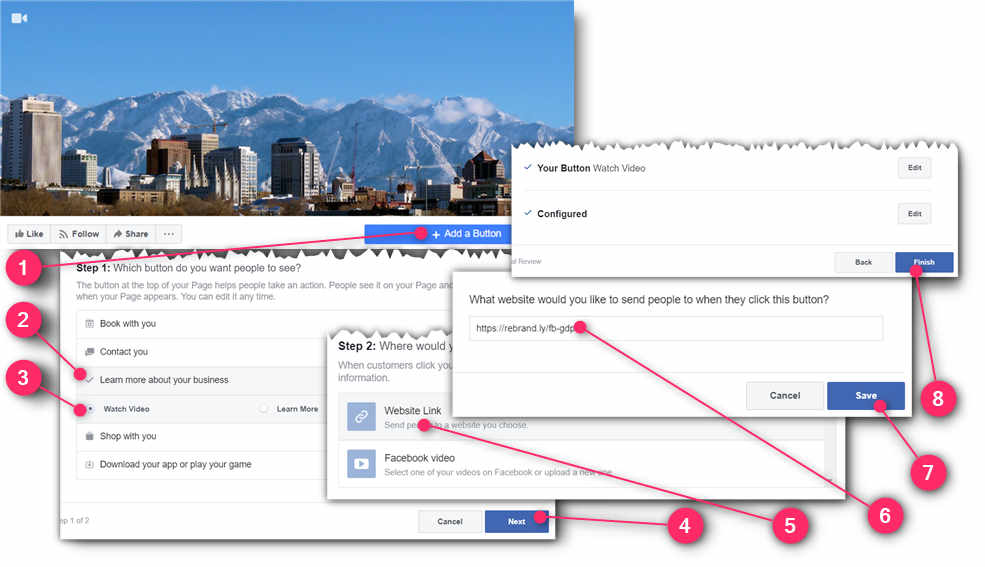
Step 7: Add a Call to Action Button
The Call to Action button sits prominently just at the bottom of your Fan Page cover photo or video. So it’s a good opportunity to get clicks to your affiliate link through this button.
Here’s how to add your call to action button:
Just below your cover photo or video, click the “Add a Button” button.
Click the “Learn more about your business” option.
To better your chances of getting more traffic to your Fan Page, you would need to let visitors know what is your Fan Page is all about. Also, Facebook uses your Fan Page Information to recommend to Facebook users who shares the same interest.
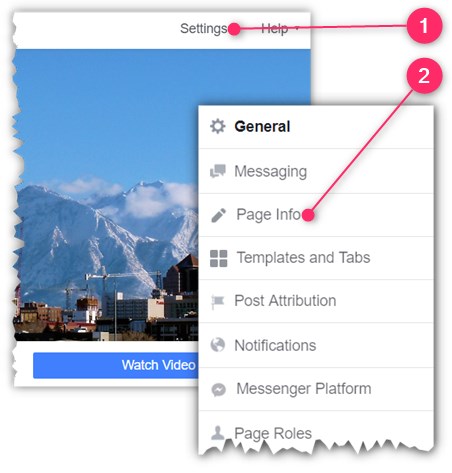
Just above your Cover Photo or Video, click the “Settings” link.
Click the “Page Info” option.
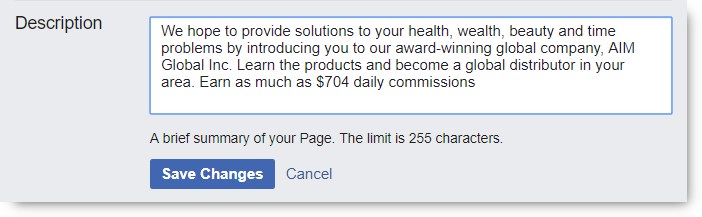
Write Your Description
Under the Description field you type-in some text to describe your page.
Don’t forget to hit the “Save” button when done.
The Description Section
For your AIM Global business, you can just copy and paste the texts inside the box below: (On your keyboard press CTRL+A to select the whole texts, CTRL+C to copy, and CTRL+V to paste)
Add 2 More Categories
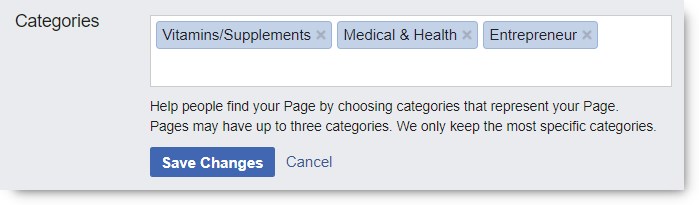
Under the Categories section you are allowed to have a total of 3 categories.
Don’t forget to hit the “Save” button when done.
The Categories Section
For your AIM Global business, I suggest you add the categories: “Medical & Health” and “Entrepreneur”.
Type-in Your Phone Number
Under the Phone Number section, put your own contact number.
Don’t forget to hit the “Save” button when done.
The Phone Number Section
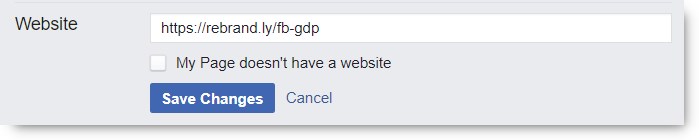
Type-in Your Website
Under the Website section, put your website address URL.
Under the Email section, put your email address. Make sure it’s your main email address -the one you always open everyday.
Or you can use sales@aimglobalproducts.com if you don’t check your email everyday.
Don’t forget to hit the “Save” button when done.
The Email Section
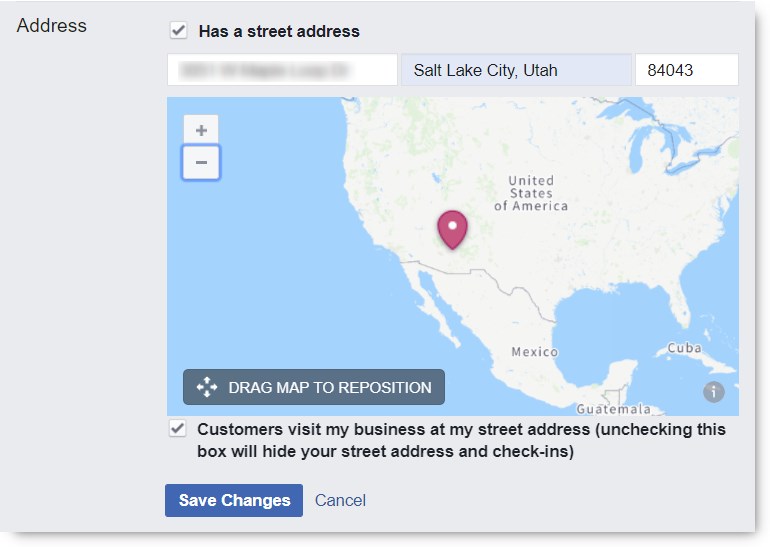
Type-in Your Address
Under the Address section, put your office or business address. This is the address you are comfortable with in meeting people in person for your business.
Don’t forget to hit the “Save” button when done.
The Address Section
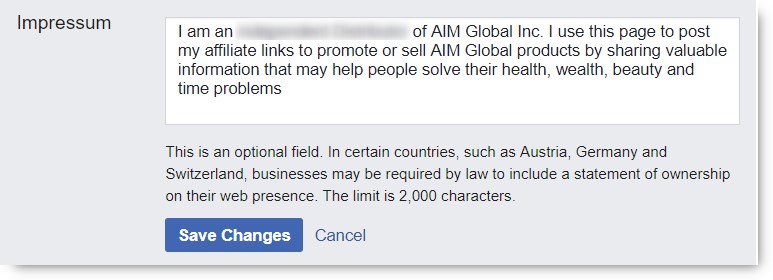
Type-in Your Impressum
Under the Impressum section, put your statement of ownership of the business page.
Don’t forget to hit the “Save” button when done.
The Impressum Section
For your AIM Global business, you can just copy and paste the texts inside the box below. Do not mislead people by not indicating your true membership role with AIM Global. Therefore indicate if you are just an Affiliate Marketer or a full pledge Independent Distributor already. (On your keyboard press CTRL+A to select the whole texts, CTRL+C to copy, and CTRL+V to paste)
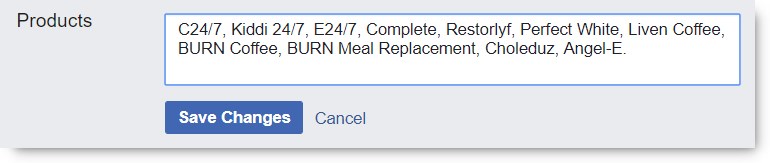
Type-in Your Products
Under the Products section, put a list of your products.
Don’t forget to hit the “Save” button when done.
The Products Section
For your AIM Global business, you can just copy and paste the texts inside the box below. (On your keyboard press CTRL+A to select the whole texts, CTRL+C to copy, and CTRL+V to paste)
What’s Next?
First up, is congratulations! You really deserve a tap on the back for achieving a milestone in your business coming up to this point. Now you have a good canvass to paint on for your business campaigns. Now you are ready to post your Affiliate Links and invite more people to your business page, and slowly but surely build your strong customer base.
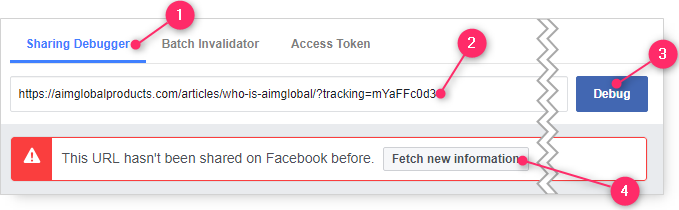
Before sharing or posting any of your Affiliate Link on Facebook, you first need to debug it. Because if you don’t, the featured image in your post will not show up. Without a featured image, your post will not stand out and will surely fail to attract many people to click your post.
In the form field, paste your Affiliate Link. You do this by right-click and choosing “Paste“.
Scroll page to the right to find and click the “Debug” button
Click the “Fetch new information” button, and it should show the featured image when you scroll down the page.
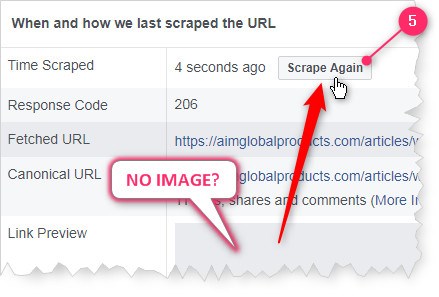
Is the featured image not showing? Don’t worry, just click the “Scrape Again” button. Scraping Again When There’s No Image Showing
Facebook Post Samples:
When there are already images showing for your Affiliate Link, you can then paste it on your Facebook Timeline, Facebook Fan Pages, Facebook Group and Messenger Chats –but before you do, write an attention grabbing ad texts before it!
You can “copy and paste” the ad texts from the sample posts below, just don’t forget to add your debugged Affiliate Link at the end!
Did you notice that they have different featured image? That’s because you can choose from the different fetched images the one you prefer to be featured in your post. You just need to click the left or right arrows to select through before hitting the “Post” button. See illustration below:
In this article I will show you an effective way to make money using a Facebook Fan Page.
Already with 2.19 billion monthly active users worldwide, Facebook is indeed a great market to make money. But what is the best way to do it? Read on!
But before you continue reading, Change to another currency? * Base currency is ₱, using today’s rate.
Earn up to $386.04 or $544.19 Daily!
In this strategy you will build your audience in your Facebook Fan Page by re-posting articles from AimGlobalProducts.com article site but bearing your Affiliate Links that will let you earn sales commissions. The idea is to build and increase your followers via Facebook Fan Page so you can always get in touch with them regularly of new posts and updates. Although these new posts or updates will be coming from AimGlobalProducts.com website, it doesn’t stop you to post your own campaigns as well, like your own promotional videos and images. As you would understand, the more followers you get to your Fan Page, the more chances your Affiliate Links will get clicks, and therefore more chances for you to earn commissions. Ideally you would aim to eventually earn at least $386.04 daily as an Affiliate or $544.19 daily as a Distributor. If you are new to Affiliate Marketing, I suggest that you first read the article, “How to Make Money Sharing Links.“
Requirements for this Strategy
For this income strategy to work, you need to have:
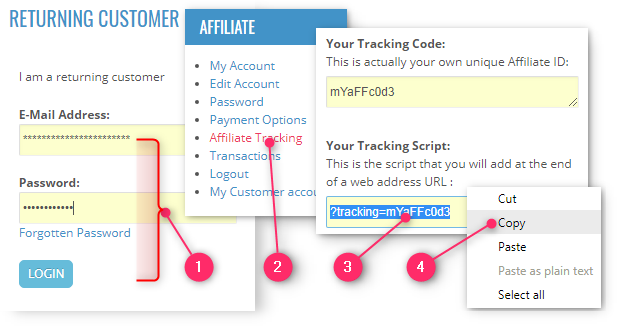
A Tracking Script is actually a piece of code that you will need to add at the end of the web address URL that you will share over Facebook. Without this Tracking Script, it’s impossible to associate you to any subsequent sale.
Scroll down the page, under the “Affiliate” section, find and click the link: “Affiliate Tracking”
Let’s say for this tutorial, as an illustration example only, your Tracking Script is: ?tracking=mYaFFc0d3. Right-click on your Tracking Script.
Choose “Copy” option. Your Tracking Script is going to be pasted in the next step to create your Affiliate Link.
Step 3: Create Your Affiliate Link
The idea here is to choose a page from this website that you would like to share, get it’s web address so you can append your Tracking Script (making it as your Affiliate Link), and then copy it as a whole so you can paste it for the next steps.
Here are the steps to create your Affiliate Link:
Creating Your Affiliate Link
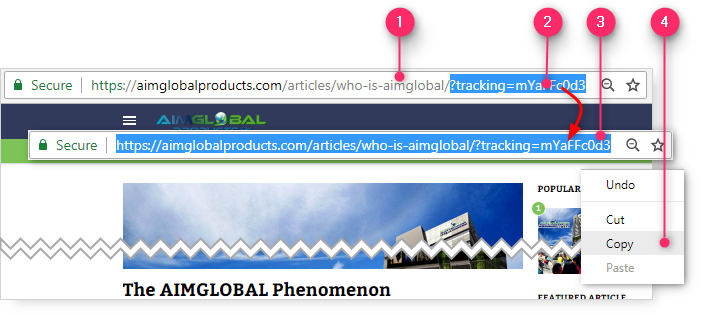
Find an article here (this website) that you will want to share, and see its web address URL in the browser bar.
For example, the article “The AIMGLOBAL Phenomenon” is at web address URL: https://aimglobalproducts.com/articles/who-is-aimglobal/
Complete your Affiliate Link by pasting your Affiliate Script at the end of the web address URL. You do this by doing a right-click at the end of the web address URL and choosing “Paste“. So in the example web address URL above, your complete Affiliate Link would be: https://aimglobalproducts.com/articles/who-is-aimglobal/?tracking=mYaFFc0d3
Highlight your complete Affiliate Link URL. You can do this by right-click and choosing “Select All“
Right-click (again) your complete Affiliate Link URL and choose “Copy” so that you can just paste it for the next steps, instead of typing it.
WARNING!
Please note that your Affiliate Link will only work in promoting pages within AimGlobalProducts.com. Needless to say, your Affiliate Links will not work in promoting any other website.
Step 4: Debug Your Affiliate Link
Before sharing or posting any of your Affiliate Link on Facebook, you first need to debug it. Because if you don’t, the featured image in your post will not show up. Without a featured image, your post will not stand out and will surely fail to attract many people to click your post.
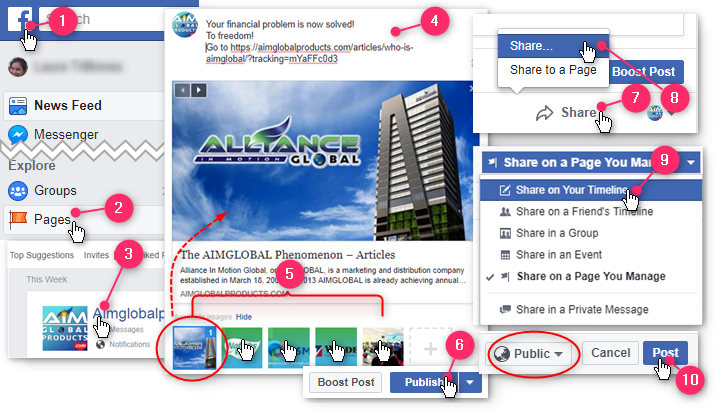
Go to your Facebook Fan Page by clicking the “Pages” icon.
Click on the title of your Fan Page.
Write a compelling message and then paste your whole Affiliate Link at the end. Just do a right-click at the end of your message and choose “Paste“.
Facebook will begin fetching images for your post, but only choose one image for better visibility. I prefer that you choose the featured image of the article (usually the first image) So you should disable the other images by clicking on each one of them, leaving the featured image left selected.
Scroll down the page and click the “Publish” button. It should now post on your Facebook Fan Page.
But why stop there. Now you can share your post on your Timeline as well! So click the “Share” button
Choose “Share…” option
Choose “Share on Your Timeline“
Make sure it’s going to be shown in “Public” mode, and finally click the “Post” button.
Step 6: Invite Likes & Shares to Your Fan Page
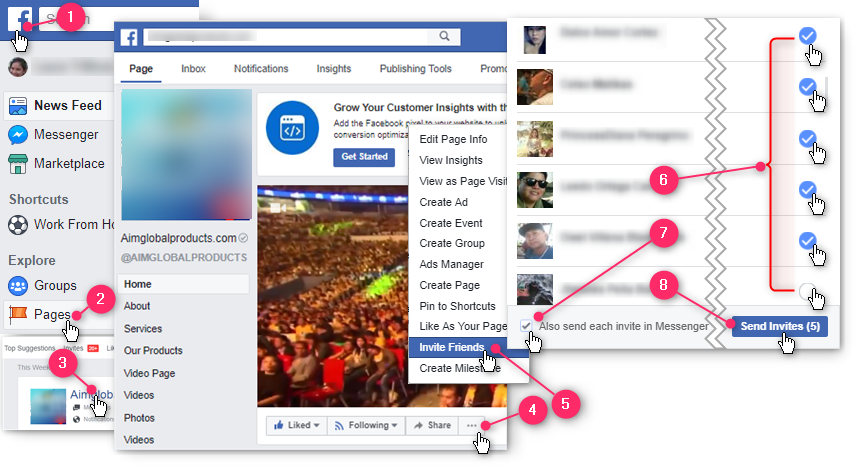
Now that your campaign is posted on your Fan Page, you can now invite more of your Facebook friends to “like and share” your Fan Page.
Here’s how you invite Likes & Shares to your Fan Page:
(If you are already logged-in your Facebook Fan Page, you can skip to STEP 4!)
Continue reposting other articles from AimGlobalProducts.com/articles with your appropriate Affiliate Links, especially if there’s a newly posted article. So always check your emails daily to get notified of new posts.
If there are no new posts yet to post, you can post related images or videos and placing in the description your relevant Affiliate Links.
Continue your daily goal of getting at least 15 Likes to your Fan Page as per Step 5 above.
Apply other strategies that will be emailed to you regularly.
It’s a NUMBERS GAME!
Remember that the more people are following your posts in your Fan Page, the more chances your Affiliate Links will get clicks. Consequently, the more clicks there are , the more chances for you to earn sales commissions.
So make sure you invite at least 15 friends, everyday to build your numbers! For example, if you are regularly getting 100 of followers weekly, you will have at least 5,200 followers in your first year alone!
Frequently Asked Questions:
Can I do this income strategy worldwide?
Yes. You can do this strategy regardless of country location.
How does the system know that the referral came from me?
When your prospect visits this site, the system will place a cookie in your prospect’s device to reside there for 180 days. This cookie bears your Affiliate ID so when your prospect eventually makes a purchase from this site, the system will fetch the cookie from his device to associate your Affiliate ID to the subsequent sale.
How do I see my earnings?
You can see your earnings, including transaction history, inside your Affiliate Account page.
How am I going to get paid?
At the time of writing, you can get paid via 3 methods: bank transfer, cheque or Paypal.